1
Contents
Contents
Introduction ..................................................................................... iii
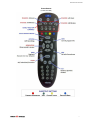
Remote Control Functions ................................................................ iv
1. Initial Startup ................................................................................1
Program the remote control ............................................................................................................... 1
Validate the set-top box ...................................................................................................................... 1
Log in ................................................................................................................................................... 2
2. Basic TV Controls ...........................................................................3
Change the channel ............................................................................................................................. 3
View Current Channel Information ..................................................................................................... 3
Set Favorites ........................................................................................................................................ 4
View the Channel Guide ...................................................................................................................... 4
Record a program or series ................................................................................................................. 5
Record a Program Once.................................................................................................................... 5
Record a Series ................................................................................................................................. 6
Autotune ............................................................................................................................................. 7
Search for programs ............................................................................................................................ 8
Quick Search ..................................................................................................................................... 8
Advanced Search .............................................................................................................................. 8
Access menus ...................................................................................................................................... 9
Get help ............................................................................................................................................. 10
Log out .............................................................................................................................................. 10
3. Optional Menu Features ............................................................. 11
Weather ............................................................................................................................................ 11
Alerts ................................................................................................................................................. 11
4. Paid Programming (PPV, PPB) ................................................... 12
Pay per View...................................................................................................................................... 12
Pay per Block ..................................................................................................................................... 13
5. Video on Demand (VOD)............................................................. 14
Rent a Video on Demand movie ........................................................................................................ 14
Quick search by category ............................................................................................................... 14
Search by expanded category list ................................................................................................... 14
Advanced Search ............................................................................................................................ 16
Navigate in a Video on Demand movie ............................................................................................. 17
6. My DVR ....................................................................................... 18
Set a Manual Recording .................................................................................................................... 18
View a recorded program ................................................................................................................. 19
Remove or stop recordings ............................................................................................................... 20
Manage My DVR................................................................................................................................ 21
Select Default DVR Settings ............................................................................................................ 21
Select Recording Priorities.............................................................................................................. 22
7. “My Services” Options ................................................................ 23
Vudu .................................................................................................................................................. 23
Telephony.......................................................................................................................................... 24
Messages ........................................................................................................................................... 24
Chat ................................................................................................................................................... 25
Register your existing account ....................................................................................................... 25
Activate fs|cdn Chat username ...................................................................................................... 26
Add a Chat buddy ........................................................................................................................... 26
Start chatting .................................................................................................................................. 26
i