1
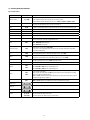
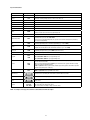
Function
Key Label
Descriptions
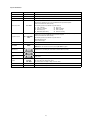
Toggle between different display formats. The available formats are: full, 4x4, 3x3, 2x2 and PIP.
Display Mode
Select a highlighted item or completes an entry that you have made.
Enter
CTRL + 1 ~ 7 , 9
Display Mode
Go Last
CTRL +
Go First
CTRL +
X times Backward play
Nr. +
X times Forward play
Nr. +
PC DVR screen mode
Go last in PC DVR
Go first in PC DVR
Fast play at x (No.) times speed in PC DVR
Fast rewind at x (1~8) times speed in PC DVR
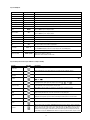
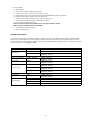
The Shuttle Ring only functions in the Playback mode.
Turning the ring clockwise plays video forward.
Turning the ring counterclockwise plays video backward.
The Jog Dial only functions when playback video has been paused.
By turning the jog dial clockwise, you can play video forward image-by-image.
Toggle On and OFF sequence mode of the selected spot output.
Displays selected camera as spot output of the current DVR.
Displays selected camera in the full-screen mode and enter the numbers in the login menu.
Up / Down / Left / Right control in the ZOOM and SET UP mode.
Handle turn clockwise for SET mode.
Handle turn counterclockwise fro ESC mode.
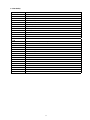
CTRL + ENTR +
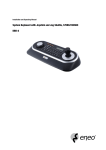
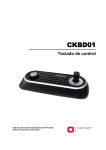
Joystick
Shuttle ring
Spot Sequence
Spot output
Full Screen
CTRL + ENTR +
Zoom Handle
AUX1 ~ 4
No. + AUX1 ~ 4
No. + MAIN
Cursor movement
ENTR + Joystick
Jog dial
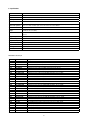
Keys for Keyboard Controller Function
Function
Key Label
Descriptions
CTRL + PRST/
MACRO
Execute Macro. e.g. No. + CTRL + PRST/MACRO
Sequence
CTRL + TOUR/SEQ
Execute Sequence. e.g. No. + CTRL + TOUR/SEQ
Sequence Stop
0 + CTRL + TOUR/
SEQ
Stop Sequence
Macro
KBD lock/unlock
777 + ENTR
Alias Preset save
No. + CTRL + ALRM
Save Alias Preset Position
Alias Preset recall
No. + ALRM
Recall Alias Preset Position
Lock/Unlock the KBD controller
4. Troubleshooting
If problems occur, verify the installation of the camera with the instructions in this manual and with other operating equipment. Isolate the problem to the
specific piece of equipment in the system and refer to the equipment manual for further information.
Problem
Possible Solution
Joystick can’t control system.
Check that the dome camera IDs are set properly.
Check the polarity of the data line.
Camera number does not match the
multiplexer number.
Check the camera ID and insert the BNC cable into the proper input of the multiplexer.
Forgot password
Consult your supplier, distributor or service center.
Multiplexer & DVR can’t work with the Joystick
controller.
2. Check the communication menu of Multiplexer as per Pages 15 (setting Multiplexer).
No Video on the KBD controller
1. Check that Back(ground) Screen On/Off
1. Check that the data cable for the multiplexer has the correct Pin configuration (1=1, 2=2, 3=3 ... 8=8).
2. Check if the Dome camera is menu status.
Tip 1: Dome Holding Time of the slave keyboard setup menu
When the dome2 port set „AUX IN” even if the slave keyboard is not used, the dome holding time has an effect on the transfer time of the command (FASTRAX
protocol only) from the dome2. Set the slave keyboard option to ON to change the dome holding time. After changing the time, set the slave keyboard option
to OFF when the slave keyboard is not used. When the slave keyboard or DVR through the dome 2 port has the same as the camera number of the master
keyboard, it can operate only after the dome holding time. But two numbers are different, at the same time two cameras can operate.
36