1
2
Step
1
Connect the Hardware
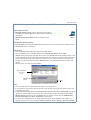
1. Make sure that the printer is switched off and that the power supply is disconnected from
the AXIS 5800 Mobile.
2. Locate the serial number, found on the underside label of the AXIS 5800 Mobile, and write
it down. You can use this number to set the IP-address of the print server. Example: Ser.
No. 00408C1802FB
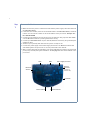
3. Connect your printer(s) to the print server’s LPT1 or LPT2 port using a printer cable. Make
sure the Bluetooth antenna is pointing towards the ceiling.
4. Connect your AXIS 5800 Mobile to your network (Ethernet Connector), using a twisted pair
category 5 cable
5. Switch on your printer(s) and make sure the printer is ready for use.
6. Connect the power supply to the Power Supply Connnector. The Network Indicator will
start flashing when the print server is correctly connected to the network.
7. Wait 1 minute and press the test button once. A test page will be printed on the connected
printer, keep it handy during the installation. The test page will show the IP address of the
print server.
LPT2
LPT1
Power Supply Connector
Ethernet
Connector
Bluetooth
Antenna
(10 base &
100 base TX)
Test Button
Power Indicator
Network Indicator