1
ABOUT THE WEB PAGES (FOR THE
ADMINISTRATOR)
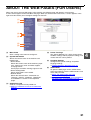
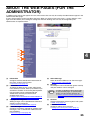
In addition to the menus that appear for users, other menus that can only be used by the administrator appear in the
administrator Web pages.
A menu frame appears on the left side of the page. When you click an item in the menu, a screen appears in the
right frame that allows you to configure settings for that item. Settings that can only be configured by the
administrator are explained here.
(1)
(2)
(3)
(4)
4
(5)
(6)
(7)
(8)
(1)
Information
Configure machine identification information for
the status & alert E-mail function.
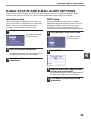
☞Information setup (page 29)
(2)
(5)
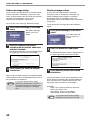
☞Alerts message setup (page 30)
(6)
Passwords
To protect the Web site, the system administrator
can establish passwords. Enter a password that you
would like to establish and click the [Submit] button.
One password can be established for the
administrator and one password can be
established for users.
Key Operator Programs
Setting changes can be prohibited and interface
settings can be configured.
☞KEY OPERATOR PROGRAMS (page 28)
(4)
Status Message
Configure parameters required for sending status
messages, such as destination addresses and
time schedules.
Security
Unused ports can be disabled for greater security
and port numbers can be changed.
Note
☞PROTECTING INFORMATION PROGRAMMED IN
THE WEB PAGE ([PASSWORDS]) (page 26)
(3)
Alerts Message
Store destination addresses for alert messages.
(7)
If "HTTP" is disabled, it will not be possible
to open the Web pages. To open the Web
pages, reset the network expansion kit.
☞ "How to reset the network expansion kit"
(page 37)
Services
Configure information concerning the e-mail system.
☞SMTP setup (page 29)
(8)
Print Port
Configure settings for e-mail print.
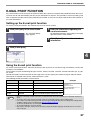
☞Setting up the E-mail print function (page 27)
☞Status message setup (page 30)
25