1
8/17
4.2
Commissioning the CS-430RC
4.2.1 Commissioning Procedure
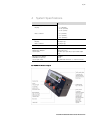
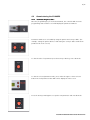
Once the programming key is inserted and turned, the controller will enter into
programming mode and the screen will display the parameter numbers.
Parameter numbers are selectable by using the spinner and conveyor dials. (For
example, setting the spinner dial to 3 and setting the conveyor dial to 5 will show
parameter 35 on the screen.)
To edit the value of a parameter press the Conveyor dial to go into edit mode.
To edit the selected parameter value, press either the upper or lower selector
button. The new parameter value will now be displayed on the screen.
Press the Conveyor Dial again to accept the new parameter and exit edit mode.
Bosch Rexroth Canada ı 16.10.2008 ı Revision 2.2