1
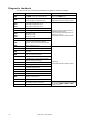
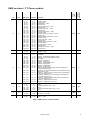
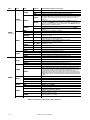
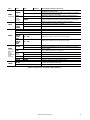
Diagnostic feedback
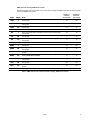
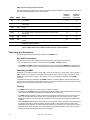
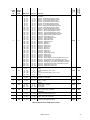
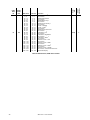
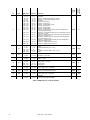
If an error occurs, one of the following messages may appear in the MAC 401 display:
24
Message
Cause...
What to do...
AIRF
The AIRF counter has reached its limit.
Clean the fixture and air filter. Reset the AIRF
counter in the INFO menu.
CSER
A fixture firmware upload was unsuccessful
and has resulted in a Checksum Error
Try to upload the firmware again.
Contact Martin Service if problem persists.
D1CO
D2CO
D3CO
D4CO
Driver PCB 1 temperature cut off
Driver PCB 2 temperature cut off
Driver PCB 3 temperature cut off
Driver PCB 4 temperature cut off
DTER
Driver temperature sensor error
FTCO
Fixture temperature cutoff
P1CO
P2CO
P3CO
P4CO
Pixel PCB 1 cut-off
Pixel PCB 2 cut-off
Pixel PCB 3 cut-off
Pixel PCB 4 cut-off
PTER
Pixel temperature sensor error
YTCO
Yoke temperature sensor cutoff. The
temperature has exceeded the allowed
maximum and the LEDs have been switched
off.
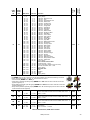
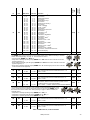
DPER
Display programming error
DREH
Zoom stepper motor driver failure.
F1ER
F2ER
Fan 1 error
Fan 2 error
FBEP
Pan feedback error. The pan correction system
could not correct a loss of step.
FBER
Pan/tilt feedback error
FBET
Tilt feedback error. The tilt correction system
could not correct a loss of step.
MERR
Communication error in EEPROM memory
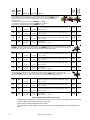
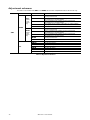
OPER
Onboard programming error
PAER
Pan timeout error. There is a malfunction in the
pan position indexing circuit.
RAME
RAM error
RCER
Real time clock error
RUER
Fixture identification code missing or invalid
TIER
Tilt timeout error. There is a malfunction in the
tilt position indexing circuit.
YTER
Yoke temperature circuit error.
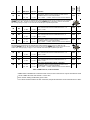
RST
Reset. This occurs when power is applied, or
when reset is selected in the menu.
SRST
Serial RESET command received via DMX
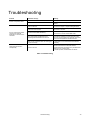
Clean the fixture and air filter and ensure
unrestricted airflow around it.
Check that ambient temperature does not
exceed 40° C (104° F).
Contact Martin Service if problem persists.
Reset fixture.
Contact Martin Service if problem persists.
Wait for reset to finish.
Note that you can prevent accidental resets via
DMX by setting PERS - DRES to OFF in
the control menus.
MAC 401™ user manual