1
NOTE: The AcqrsXX_get functions return the configuration values to be used for the next acquisition.
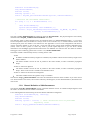
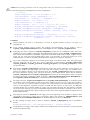
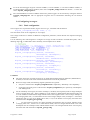
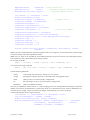
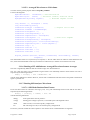
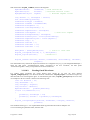
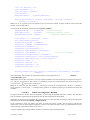
Use the following short code fragment for a device configuration:
// Configure
double sampInterval = 1.e-9, delayTime = 0.0;
long nbrSamples = 10000, nbrSegments = 1;
long channel = 1, coupling = 1, bandwidth = 0;
double fullScale = 2.0, offset = 0.0;
long trigCoupling = 0, trigSlope = 0;
double trigLevel = 20.0; // in % of vertical Full Scale !
AcqrsD1_configHorizontal(instrID, sampInterval, delayTime);
AcqrsD1_configMemory(instrID, nbrSamples, nbrSegments);
AcqrsD1_configVertical(instrID, channel, fullScale, offset, coupling,
bandwidth);
AcqrsD1_configTrigClass(instrID, 0, 0x00000001, 0, 0, 0.0, 0.0);
AcqrsD1_configTrigSource(instrID, channel, trigCoupling, trigSlope,
trigLevel, 0.0);
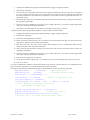
Comments:
Channel numbers run from 1 to nbrChannels, not from 0! Segment numbers, however, run from 0 to
(nbrSegments – 1).
If the desired sampling interval implies that multiple converters/channel will be needed a call to
AcqrsD1_configChannelCombination will be needed before the call to AcqrsD1_configHorizontal.
Specifying more than 1 segment in AcqrsD1_configMemory implies the use of Sequence mode. The 10-bitFAMILY & U1071A-FAMILY instruments offer additional functionality through AcqrsD1_configMemoryEx.
This includes the Simultaneous multibuffer Acquisition and Readout (SAR) mode to allow a higher loss-less
trigger rate. For such units with extended memory there is the possibility of restricting memory use to the
internal memory to reduce the maximum dead time between segments of a sequence acquisition.
The 5 main configuration functions are protected against illegal or incoherent values. Thus, the system might
adapt the values you ask for. There are 5 'query' counterparts to these functions, AcqrsD1_getHorizontal,
AcqrsD1_getMemory, AcqrsD1_getVertical, AcqrsD1_getTrigClass, and AcqrsD1_getTrigSource, which
you can interrogate.
The function AcqrsD1_configTrigClass configures the trigger class control parameters of the digitizer. For
most Acqiris products, the edge trigger class is the only class available. For this class, the available source
patterns are Channel 1 through 4 or the external triggers. The AcqrsD1_configTrigSource function configures
the source parameters coupling, slope, and level as shown in the example above. Notice that the functions
AcqrsD1_configTrigClass and AcqrsD1_configTrigSource must always be used together in order to complete
the setup of the trigger configuration. Refer to chapter 2, DEVICE DRIVER FUNCTION REFERENCE of
the Programmer's Reference Manual for a detailed description of these two functions.
The helper functions AcqrsD1_bestSampInterval and AcqrsD1_bestNominalSamples are sometimes useful
for deciding on the nominal number of data points and the sampling interval to use for a given time window to
cover. If you ask for a nominal number of samples, the system actually needs some additional samples for
reasons of data alignment, acquisition stop-time overhead and other reasons. In some cases, the additional
'invisible' samples can exceed the number of 'visible' ones. The helper functions take such memory overheads
into account when advising you on the recommended sampling interval and number of samples. You are free to
ignore the advice, but the system is likely to adapt your setup values if the requested number of samples does not
fit the available memory.
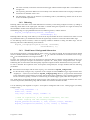
Specifying the value 0 for delayTime sets the trigger point to the beginning of the waveform. A negative value
corresponds to pre-trigger, a positive one to post-trigger. Refer to the section3.13, TRIGGER DELAY AND
HORIZONTAL WAVEFORM POSITION for a detailed explanation of the use of delayTime.
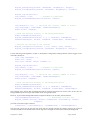
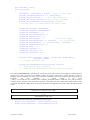
For DC coupling the trigger levels in %FS as needed by AcqrsD1_configTrigSource can be calculated as
follows:
TriggerLevelPercent = 100*(TriggerLevelVolts + vOffset)/Fsrange;
The granularity of a trigger value setting is limited by the hardware that uses an 8-bit DAC covering somewhat
more than the desired range.
Programmer’s Guide
Page 23 of 66