1
MIRACLE STEAMER
OPERATION
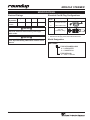
IMPORTANT: 220/240V Miracle Steamers are factory programmed for the following recommended
settings:
General
When the Operate button (Figure 3) is pressed, power
is supplied to the water pump. The pump operates and
water sprays onto the heated Steam Generator. The
water flashes immediately into live steam and shoots
down onto the product.
• Total Cycle Time (CYC) = 15 min., 00 secs.
(Range: 1 seconds to 99 minutes 59 seconds)
• Shot Interval Time (SHO) = 00 min., 20 secs.
(Range: 1 seconds to 5 minutes 59 seconds)
One of two operational modes can be used:
Single Shot or Timed Cycle
• Steam Shot Time (H2O) = (0.80) or 0.80 second
(range: 0.01 to 2.50 seconds)
SINGLE SHOT
The Operate button is pressed to initiate a single steam
shot. The control board applies power to the water
pump/solenoid and a “shot” of steam occurs.
This converts approximately 1/4 oz. (7.5 milliliters)
of water to steam every 20 seconds for a 15 minute
cooking cycle. To change any of these settings see
PROGRAMMING on this page.
TIMED CYCLE
Operating Instructions
The control is used to set the desired cook time (up
to 99 minutes, 59 seconds). When the Start/Stop button is pressed, the Control Board applies power to the
water pump/solenoid at regular intervals for the duration of the displayed cycle time. The display counts
down to zero and, when the cycle is complete, sounds
an audible signal, and then reverts back to the original
programmed cycle time. The unit is then ready for the
next cycle.
1. Turn the Rocker Switch (power On/Off) to ON
(Figure 3).
2. Allow the unit to preheat for approximately 20-30
minutes.
NOTE: Do not push any of the buttons during
warm-up time or when the display flashes “LOW.”
This indicates that the unit is NOT up to operating
temperature.
3. Pull out the Spatula or Drawer Assembly and
place the product to be steamed onto the
Spatula.
4. Push the Spatula or Drawer Assembly fully into
the steamer.
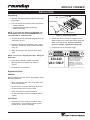
Message
Display
UP
D O WN
P R GM
START/STOP
5. Single Shot: Press and release the Operate button, wait 20 seconds for the steam to penetrate
the product.
Timed Cycle: Press the Start/Stop button to
begin the steaming cycle. The display will count
down to zero and an audio signal will sound at
the end of the steaming cycle.
Start/Stop
Button
Operate
Button
Rocker Switch
(Power On/Off)
POWER
6. Remove steamed product.
Programming
CYC (Total Cycle Time) refers to the total amount of
cooking time set for the product.
Figure 3. Operating Controls
RATE (Shot Interval Time) is the time set between
shots of steam during a complete cycle.
SHOT setting (Steam Shot Time) is used to adjust
the water volume used during each pump/solenoid
operation.
P/N 1010881 06/04
9