1
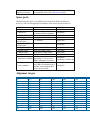
This allows the user to view the Wavelength offsets stored in the EEPROM.
Performing a correction to ASTM E903-C-OS/2
If you are using a NIST Standard Reference material (SRM) (e.g. White ceramic tile)
as the reference disk then you should enter the calibrated reflectance values as a
continuum in the Cary system. To do this, create an ASCII file and enter the list of X
and Y data pairs (separated by commas). Save this ASCII file in the '.CSV' format.
If you are using the PTFE reference disk supplied with the DRA, then the following
values may be used. These values are approximate only. The PTFE reference plate
has not been calibrated. The reflectance values are representative of the PTFE
reference plates supplied with the DRA(3).
1. Click the Windows Start button, then Programs, then Cary WinUV, and then
Scan.
2. Click the Setup button.
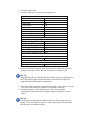
3. Set the following parameters:
Cary tab
X mode: Mode
X mode: Start
X mode: Stop
Y mode: Mode
Y mode: Y min
Y mode: Y max
Show status display
Nanometers
300
2000
%R
-5.00
110.00
ON
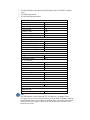
Options tab
SBW/Energy: Beam mode
Double
SBW/Energy: Slit height
Reduced
Source/Detector: Lamps
UV-Vis
Source: Source changeover (nm) 350.0
Source: Detector changeover (nm)800.0
Independent tab
Independent control
Measurement mode
UV-Vis controls
Ave time (s)
Data interval (nm)
Scan rate (nm/min)
SBW (nm)
NIR controls
Ave time (s)
Data interval (nm)
Scan rate (nm/min)
Energy level
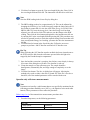
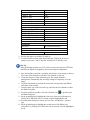
ON
Auto
0.1
1.000
600.00
2.00
1.000
2.000
120.00
3.00