1
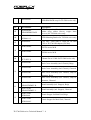
default track 1 leading code is “%”; the default track 2 and track 3 leading code is “;”;
the default ending code is “?”.
INTERCHARACTER TRANSMISSION DELAY
Usually, the processing algorithm and the keyboard data input buffer in an
operating system are arranged in such a way that the system resources are preserved as
much as possible while data input from the keyboard port presents no problem.
However, as we know that the amount of data read from one single stroke of MSR can
be much much larger than any possibly fastest keyboard entry in same duration. Some
operating system may be unable to handle such a bunch of data in so short time.
Therefore, a so-called intercharacter delay is introduced to allow the keyboard
controller to digest the input data. When data read from the MSR is marching to the
keyboard controller, a programmable time delay is inserted between any two characters.
The value to define this intercharacter delay ranges from 1 to 32. The correspondent
delay time ranges from 4 ms to 66 ms.
RESET TO ENGLISH DEFAULTS
RESET TO NON-ENGLISH DEFAULTS
These two options provide users to reset all the MSR maneuver functions to the
proper defaults according to the system language the users uses. This consideration
involves mostly of the Alt-Num emulation and the intercharacter delay.
SAVE AND EXIT
Clicking on this item saves all parameter and exits the program.
CANCEL AND EXIT
Clicking on this item discards all parameter changes and exits the program.
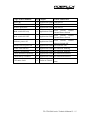
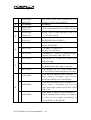
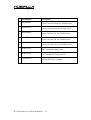
SOFTWARE COMMAND INDEX
Following table is a collection of software command applicable to the Jiva SL
(TP5700) & Jiva EL (TP5800) series for a quick look up. The page number listed
could deviate from the display of this file if different viewer is utilized.
TP-5700/5800 series Technical Manual 5 - 14