1
QT-CD121
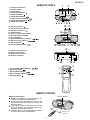
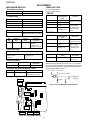
NAMES OF PARTS
1. Cassette Compartment
2. CD Compartment
3. Tuning Control
4. (TAPE) Record Button:
5. (TAPE) Play Button:
6. (TAPE) Rewind Button:
7. (TAPE) Fast Forward Button:
8. (TAPE) Stop/Eject Button: /
9. (TAPE) Pause Button:
2
1
3
4 5 6 7 8 9
10 11
10. (CD) Play Indicator:
11. (CD) Track Number Indicator
12. (CD) Repeat Indicator:
13. Volume Control
14. Function Selector/Power Switch
15. Extra Bass Button: X-BASS
16. Surround Button
17. (CD) Track Down/Review Button:
18. (CD) Track Up/Cue Button:
19. (CD) Stop Button:
20. (CD) Play/Repeat Button:
12
13 14 15 16 17 18 19 20
21
21. FM Telescopic Rod Aerial
22. Battery Compartment
23. AC Power Input Socket
24. Headphones Socket
22
3
1
1. (CD) Track Down/Review Button:
2. (CD) Pause Button:
3. (CD) Play/Repeat Button:
4. (CD) Track Up/Cue Button:
5. (CD) Stop Button:
24 23
4
2
5
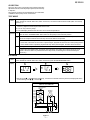
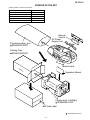
REMOTE CONTROL
Notes concerning use:
Replace the batteries if control distance decreases or operation becomes erratic.
Periodically clean the transmitter LED on the
remote control and the sensor on the main unit
with a soft cloth.
Exposing the sensor on the main unit to strong
light may interfere with operation. Change the
lighting or the direction of the unit.
Keep the remote control away from moisture,
excessive heat, shock, and vibrations.
Remote Sensor
15
15
8" - 20'
(0.2 m - 6 m)
0,2 m - 6 m
–3–