1
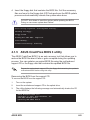
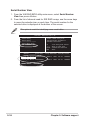
Serial Number View
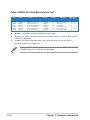
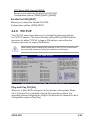
1. From the VIA RAID BIOS utility main menu, select Serial Number
View then press <Enter>.
2. From the list of channel used for IDE RAID arrays, use the arrow keys
to move the selection bar on each item. The serial number for the
selected drive is displayed at the bottom of the screen.
This option is useful for identifying same model disks.
VIA Tech. RAID BIOS Ver 1.xx
Create Array
Delete Array
Create/Delete Spare
Select Boot Array
Serial Number View
Channel
Drive Name
Serial_Ch0 Master
Master XXXXXXXXXXX
Serial_Ch1 Master XXXXXXXXXXX
5-18
Serial Number:
Create a RAID array with
the hard disks attached to
VIA RAID controller
F1 :
↑,↓ :
Enter:
ESC :
View Array/Disk Status
Move to next item
Confirm the selection
Exit
Array NameMode Size(GB)Status
ARRAY 0 SATA 999.99 XXXXXXX
ARRAY 0
SATA 999.99 XXXXXXX
XXXXXXXX
Chapter 5: Software support