1
3-50
Compaq ProLiant 8500 Server Maintenance and Service Guide
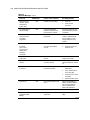
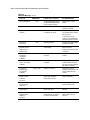
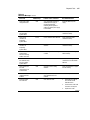
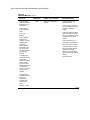
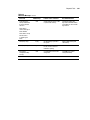
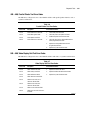
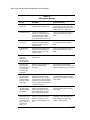
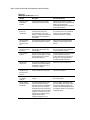
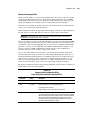
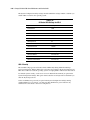
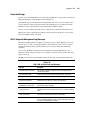
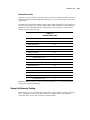
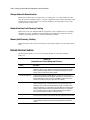
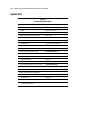
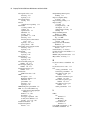
Table 3-21
ADU Diagnostic Messages continued
Message
Description
Recommended Action
Logical Drive X
status =
OVERHEATED
The Intelligent Array Expansion System
temperature is beyond safe operating
levels and the system has shut down
to avoid damage.
Check the fans and the operating
environment.
Logical Drive X
status =
OVERHEATING
The Intelligent Array Expansion System
temperature is beyond safe operating
levels.
Check the fans and the operating
environment.
Logical Drive X
status =
RECOVERING
A physical drive in this logical drive
has failed and has now been replaced.
The replaced drive is rebuilding from
the mirror drive or the parity data.
Nothing needs to be done. Normal
operations can occur.
Logical Drive X
status = WRONG
DRIVE REPLACED
A physical drive in this logical drive
has failed. The incorrect drive was
replaced.
Replace the drive that was incorrectly
replaced. Then, replace the original drive
that failed with a new drive. Do not run the
System Configuration Utility to reconfigure;
data on drive will be lost.
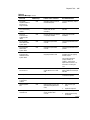
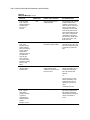
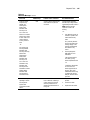
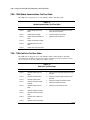
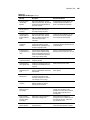
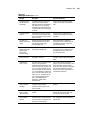
Loose cable detected
– Logical drives may
be marked FAILED
until corrected.
ADU found loose cable. If logical drives
are marked FAILED, those logical
drives will be unusable until the
problem is corrected.
Turn off the system. Check cables for tight
connection to logical drives. Restart
system. If same message recurs, cables
may be bad.
Loose cable detected
– Logical drives may
be marked FAILED
until corrected.
Controller unable to communicate with
one or more physical drives, probably
because of a cabling problem. Logical
drives may be in a FAILED state until
the condition is corrected, preventing
access to data on the controller.
Check all controller and drive cable
connections.
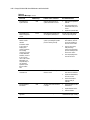
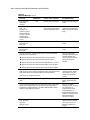
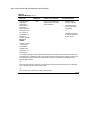
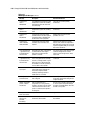
Mirror data
miscompare
Data was found at reinitialization in the
posted write memory; however, the
mirror data compare test failed
resulting in data being marked as
invalid. Data loss is possible.
Replace the array accelerator board.
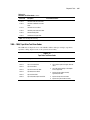
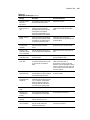
No configuration for
accelerator board
The array accelerator board has not
been configured.
If the array accelerator board is present,
run the Array Configuration Utility (ACU) to
configure the board.
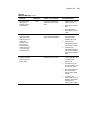
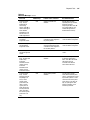
NVRAM configuration
present, controller
not detected
EISA nonvolatile RAM has a
configuration for an array controller,
but there is no board in this slot. Either
a board has been removed from the
system or a board has been placed in
the wrong slot.
Place the array controller in the proper slot
or run the System Configuration Utility to
reconfigure nonvolatile RAM to reflect the
removal or new position.
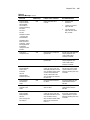
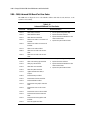
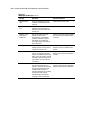
RIS copies between
drives do not match.
Copies of RIS on drive do not match.
Upgrade ADU to the most recent version.
SCSI Port X
Drive ID X has
exceeded
threshold(s).
Monitor and performance threshold for
this drive has been violated.
Check for the particular threshold that has
been violated.
continued