1
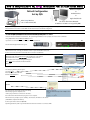
How To Setup ASUS WL 330gE Wireless for PMII in Network Mode
PNOmation II
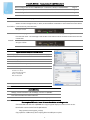
Computer
or
Android Device
or
Apple iPad/iTouch
Your wireless network router
Wireless or Cable
connection to
your Home Network
Internet Modem
PMII gets its IP address from your home network
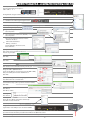
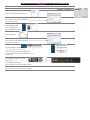
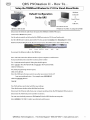
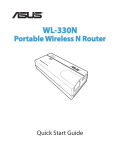
Reset ASUS 330gE set as an Ethernet Adapter
For best results, go to qrsmusic.com. to download and install the latest PMII driver update. Instructions using Driver V3.66.
Press and hold the Reset button on the edge of the ASUS until the power light flashes at least three times.
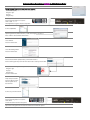
If the “Power” light is yellow, tap the PLx button once so that the light turns green.
Point the remote at the button on the PLx box. The “System” light will flash, w/ voice prompts, on remote control commands.
Using a QRS Remote: Press SHIFT then FUNC then 9 9 1.
If you have one of the smaller QRS remotes: press F1/Source then 9 9 1.
PLx The PLx Network light should now be yellow.
Power System Network View the available wireless devices using your iPad, iTouch, Android device or Wireless Computer.
Connect to the “ASUS” from the list and wait until a connection is established.
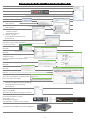
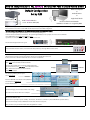
Open Apple Safari, Android Web Browser or Google Chrome on a Computer:
In your web browser, enter 192.168.1.220 in the URL address window.
The “Authentication Required” dialog box will appear.
Enter admin in the User Name and Password fields.
Click Log In.
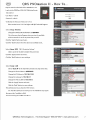
Apple The ASUS programming window opens.
Click on the Adapter tab.
In the Available Network List , click on the radio button for your local network.
Our example shows ASUS QRS AP.
Click the Connect button.
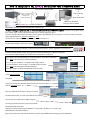
You may need to provide a password to your network.
Use the “Add” button if your local network is hidden.
Enter the password of your home router if required.
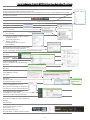
This yellow message box will appear.
Click OK
The ASUS will save and restart with the new settings
Wait for the Progress to complete.
At this point you will loose connection to the ASUS...
Close the browser window when the progress is 100% complete.
Wait for the voice prompt to report the new IP Address from your network: “Network”...“Connected”...”IP Address xxx.
[FUNC INFO to repeat the IP Address]
Connect your wireless device to home router.
Open Google Chrome, Safari or your Android browser and enter IP Address that was reported to connect to PMII.
Google Chrome Android