1
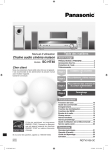
SC-HT40
AV Control Receiver
SA-HT40
Front speakers
SB-PF40
Surround speakers
SB-PS40
Center speaker
SB-PC40
Subwoofer
SB-W40
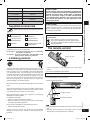
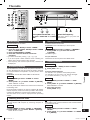
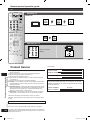
Supplied accessories
Please check and identify the supplied accessories.
1 AC power supply cord
(K2CB2CB00018)
1 FM indoor antenna
(RSA0007-L)
1 AM loop antenna
(N1DAAAA00002)
1 Remote control
(N2QAYB000009)
2 Batteries
1 speaker sticker sheet
(RQCAV0006)
Use the numbers indicated in parentheses when asking for
replacement parts. (As of January 2006)
CAUTION!
DO NOT INSTALL OR PLACE THIS UNIT IN A BOOKCASE,
BUILT-IN CABINET OR IN ANOTHER CONFINED SPACE.
ENSURE THE UNIT IS WELL VENTILATED. TO PREVENT
RISK OF ELECTRIC SHOCK OR FIRE HAZARD DUE
TO OVERHEATING, ENSURE THAT CURTAINS AND
ANY OTHER MATERIALS DO NOT OBSTRUCT THE
VENTILATION VENTS.
CAUTION!
Supplied accessories/Listening caution/The remote control
System
Do not place anything on top of this unit or block the heat
radiation vents in any way. In particular, do not place tape
decks or CD/DVD players on this unit as heat radiated from it
can damage your software.
If you see this symbolInformation on Disposal in other Countries outside the
European Union
This symbol is only valid in the European Union.
If you wish to discard this product, please contact
your local authorities or dealer and ask for the correct
method of disposal.
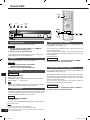
The remote control
In the U.S.A. : To order accessories, refer to “Accessory
Purchases” on page 22.
In Canada : To order accessories, call the dealer from
whom you have made your purchase.
1
3
R6/LR6, AA, UM-3
Listening caution
2
2
EST. 1924
Selecting fine audio equipment such as the unit you’ve just
purchased is only the start of your musical enjoyment. Now it’s
time to consider how you can maximize the fun and excitement
your equipment offers. This manufacturer and the Electronic
Industries Association’s Consumer Electronics Group want you
to get the most out of your equipment by playing it at a safe
level. One that lets the sound come through loud and clear
without annoying blaring or distortion-and, most importantly,
without affecting your sensitive hearing.
• Insert so the poles (+ and -) match those in the remote
control.
• Do not use rechargeable type batteries.
Use
Aim at the sensor, avoiding obstacles, at a maximum range of
7 m (23 feet) directly in front of the unit.
Remote control signal sensor
We recommend that you avoid prolonged exposure to excessive
noise.
POWER
MENU
SETUP
TUNE
ENTER
SURROUND
MUSIC
INPUT SELECTOR
VOLUME
RETURN
MUSIC PORT
Sound can be deceiving. Over time your hearing “comfort level”
adapts to higher volumes of sound. So what sounds “normal”
can actually be loud and harmful to your hearing.
7 meters (23 feet)
Guard against this by setting your equipment at a safe level
BEFORE your hearing adapts.
To establish a safe level:
• Start your volume control at a low setting.
• Slowly increase the sound until you can hear it comfortably
and clearly, and without distortion.
RECEIVER
^
AV
SYSTEM
TV/VIDEO
3
5
6
7
8
9
0
>10
SUBWOOFER
Note
MUTING
VOLUME
=
SLOW/SEARCH
i
t
STOP
PAUSE
g
h
y
PLAY
q
FUNCTIONS
DIRECT NAVIGATOR
• Keep the transmission window and the unit's sensor free from
dust.
• Operation can be affected by strong light sources, such as
direct sunlight, and the glass doors on cabinets.
TOP MENU
TUNER
DIRECT TUNING
ENTER
SC-HT40PP.indb 3
SUB MENU/
PLAY LIST
RETURN
-EFFECT
C.FOCUS
OFF
RQTV0105
2
u
Taking a minute to do this now will help to prevent hearing
damage or loss in the future. After all, we want you listening for
a lifetime.
Transmission window
VOLUME
BAND
1
4
SKIP
Once you have established a comfortable sound level:
• Set the dial and leave it there.
TV
TV
^
TUNER DVR/DVD-P
-LEVEL
TEST
%PL
MUSIC
MOVIE
3
SFC
1/20/2006 5:26:10 PM