1
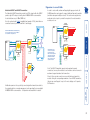
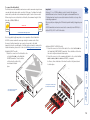
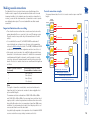
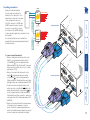
T R A N IT S M 2 T 0 R 0 IN IN A D D E R N LI IN K IN IN O U T w w T D A R E D K LI N T U 2 0 8 M S N LIN K8 LIN K4 0 ON 1 2 3 4 5 6 7 8 91 LIN K7 LIN K3 E R T LIN K6 LIN K2 IT LIN K5 LIN K1 U O m R T A D D E R® PO W ER Connecting the power input to the AV204 or AV208 transmitter O o r. c e d w .a d Connecting the power input to the AV200 transmitter A Important AdderLink AV200 transmitters and receivers are supplied with power adapters which provide a slightly different voltage to those used with other Adder products. Although the AV200 family power adapters appear to be physically identical, they are labelled as 5.3VDC (rather than the usual 5VDC). Using a standard Adder 5VDC power supply will not cause damage but may affect operation. E To connect the power supply NOTE: Please read and adhere to the electrical safety information given within the Safety information section of this guide. In particular, do not use an unearthed power socket or extension cable. 1 Attach the output connector of the power supply to the socket labelled POWER on the AdderLink AV transmitter. 2 Insert the IEC connector of the power cable into the corresponding socket of the power supply. 3 When all other connections have been made at the transmitter and receiver modules, connect the other end of the power cable to a nearby earthed mains socket. 13