1
•
Quad standard, 3D composite video decoding — Provides advanced decoding
of composite NTSC 3.58, NTSC 4.43, PAL, and SECAM for integration into systems
worldwide using a temporal 3D adaptive comb filter.
•
User presets — Store optimized image settings to be recalled later.
•
Internal test patterns — Include a crop pattern, grayscale, color bars, alternating
pixels, blue mode, and audio pink noise for calibration and setup.
•
Front panel security lockout (executive modes) — Locks out all or some front
panel functions. Full controls remain available through the Extron Product Configuration
Software, USB, or RS-232 control.
•
Contact closure remote control with tally output — Allows for remote selection of
an input channel, while a tally output provides +5 VDC to light an LED to indicate the
currently selected input.
•
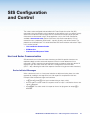
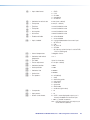
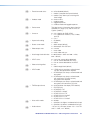
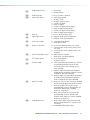
RS-232 control port — Enables the use of serial commands for complete control
and configuration via an integrated control system. Extron products use the Simple
Instruction Set (SIS) command protocol, a set of basic ASCII commands that allow for
quick and easy programming.
•
Front panel USB configuration port — Enables easy configuration without having to
access the rear panel.
•
Compact 1U, half rack width metal enclosure — Allows for inconspicuous
under-table placement using the optional mounting kits.
•
Includes LockIt HDMI cable lacing brackets
•
Internal universal power supply — The 100-240 VAC, 50-60 Hz international power
supply provides worldwide power compatibility.
Controlling the Scaler
The scaler can be controlled using one or more of the following methods:
•
The front panel controls and the On-screen Display (OSD) menu.
•
A computer, a touch screen panel, or any other device that can send and receive serial
communications through the USB or RS-232 port. Use the Extron DataViewer utility on
the connected device to enter SIS commands.
•
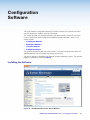
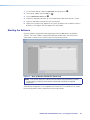
The Extron Product Configuration Software (PCS) on a computer with a Windows®
operating system.
IN1604 DTP and IN1604 HD Scalers • Introduction
5