1
Module Installation
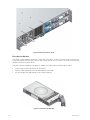
The SR1202 enclosure is supplied fully populated with all plug-in modules installed. For information
on removal/replacement of plug-in modules, please refer to Chapter 5, ”Troubleshooting and Problem
Solving”, on page 39.
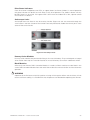
Management Interfaces
The following management interfaces are provided and used to configure, manage and monitor the
SR1202 RAID Controller Module Storage Solution.
StorView® Storage Management Software
StorView® Storage Management software is a full-featured graphical HTML-based software suite
designed to configure, manage and monitor the SR1202 RAID Controller Module Storage Solution.
StorView® provides the centralized local and remote management tool to control primary storage
assets vital to ensuring maximum data reliability, network up-time, and system serviceability. It also
allows you to manage and monitor the storage system from a host running StorView® locally and
from a web browser across the intranet or internet.
StorView® comprises the StorView® Server which runs as a background service and is responsible
for managing the installed modules.
The StorView® Server discovers system storage devices, manages and distributes message logs,
and communicates with other StorView® Servers installed on the same local and external subnet
networks.
A GUI provides the interface in an HTML-based front end which is accessed using a web browser.
The software incorporates a web server, Apache 2.0, that provides the interface between the StorView®
Server and GUI. During installation the web server is automatically configured.
! IMPORTANT
The embedded StorView module is installed on the SR1202 RAID Controller Module so the Storview®
program is not required.
Please refer to the following documents:
•
Quickstart Guide
•
MAXDATA SR1202 M1 – StorView® RAID User Guide
RAID Configuration Utility (Menu-based)
The SR1202 RAID Controller Module firmware based programs are accessed through a VT-100 terminal
using a menu-based RAID Configuration Utility interface.
RAID Configuration Utility (Text-based)
The SR1202 RAID Controller Module firmware based programs are accessed through a VT-100 terminal
using a text-based RAID Configuration Utility interface.
30
Getting Started