1
Connections
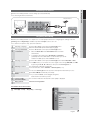
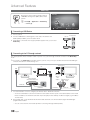
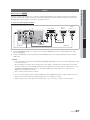
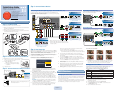
Connecting to an AV Device
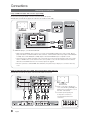
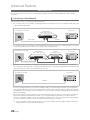
Using an HDMI / DVI Cable: HD connection (up to 1080p)
We recommend using the HDMI connection for the best quality HD picture.
Available devices: DVD, Blu-ray player, HD cable box, HD satellite receiver (STB).
<
BD/DVD player/
HD cable/Sat. box
<
Red White
Device
HDMI OUT
DVI OUT
AUDIO OUT
9!$9
✎ HDMI IN 1(DVI), 2, 3, 4 / PC/DVI AUDIO IN
x
When using an HDMI/DVI cable connection, you must use the HDMI IN 1(DVI) jack for video. A DVD, Blu-ray
player, HD cable box, HD STB satellite receiver, cable box, or STB satellite receiver may require a DVI-HDMI (DVI
to HDMI) cable or DVI-HDMI (DVI to HDMI) adapter. The PC/DVI AUDIO IN jack is required for audio.
x
The picture may not display normally (if at all) or the audio may not work if an external device that uses an older
version of HDMI mode is connected to the TV. If such a problem occurs, ask the manufacturer of the external
device about the HDMI version and, if out of date, request an upgrade.
x
Be sure to purchase a certified HDMI cable. Otherwise, the picture may not display or a connection error may
occur.
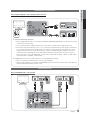
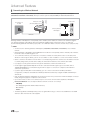
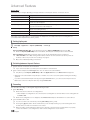
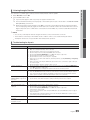
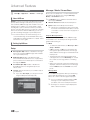
Using a Component Cable: (up to 1080p), Using an Audio/Video Cable: (480i only)
Available devices: DVD, Blu-ray player, cable box, STB satellite receiver, VCR
✎ When connecting to AV IN 1, the
Y
W
R
W
R
R
B
color of the AV IN 1 [Y/VIDEO] jack
(Green) does not match the color of
the video cable (Yellow).
G
✎ For better picture quality, the
W
R
W
R
Y
9!$9
R
AUDIO OUT
B
VIDEO OUT
G
VCR
AUDIO OUT COMPONENT OUT
9!$9
.
.:
Component connection is
recommended over the A/V
connection.
Blu-ray player
<
;
<
<
English
;
Yellow Red White Red
:
Blue Green