1
Traffic Management
Switch Administration
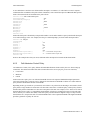
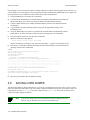
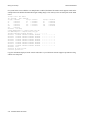
Use the trafficdescriptor commands to view, create, and delete traffic descriptors.
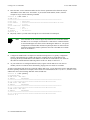
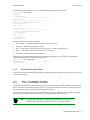
For example, enter the show
trafficdescriptor
command to view all currently defined traffic descriptors.
SmartCell ZX# show trafficdescriptor
==================================================================================
TD# Traff
Desc QoS Peak Cell Rate Sust Cell Rate Max Burst Size Aal
Type
Type
(Kb/s)
(Kb/s)
(Kb/s)
Type
CLP_0 CLP_0+1 CLP_0 CLP_0+1 CLP_0 CLP_0+1
==================================================================================
2
CBR
2
1
0
100
0
0
0
0
5
6
UBR
11
0
0
100
0
0
0
0
5
7
UBR
11
0
0
0
0
0
0
0
5
176 NRTVBR
2
1
0
1585
0
0
0
0
5
SmartCell ZX#
Note
You cannot use the default traffic descriptors for user-defined PVCs. All traffic
descriptors used to define PVCs must be created by the user.
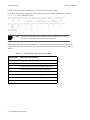
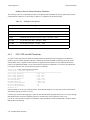
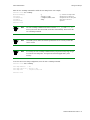
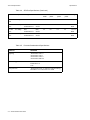
The Descriptor Type parameter in the example above corresponds to the traffic descriptor types defined in the
UNI3.0/UNI3.1 specification. Descriptor types are specified numerically and correspond to the descriptions in
Table 4-2.
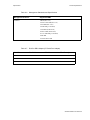
Table 4-2
Traffic descriptor type number explanation
Type Number
Descriptor Characteristics
1
No Traffic Descriptor
2
Traffic Descriptor with no CLP and no SCR
3
Traffic Descriptor with CLP, no Tagging, and no SCR
4
Traffic Descriptor with CLP, Tagging, and no SCR
5
Traffic Descriptor with no CLP and SCR
6
Traffic Descriptor with CLP, no Tagging, and SCR
7
Traffic Descriptor with CLP, Tagging, and SCR
11
Traffic Descriptor with CLP and best effort
4-18 SmartCell 6A000 User Guide