1
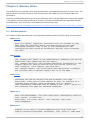
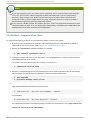
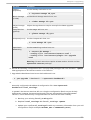
Chapt er 3. Upgrading o penstack-no va-sched ul er On any system acting as one of your Compute servers, install the following: o penstack-no va-co mmo n o penstack-no va-co mpute pytho n-neutro n o penstack-neutro n pytho n-neutro ncl i ent pytho n-no vacl i ent pytho n-no va o penstack-neutro n-o penvswi tch bri d g e-uti l s 2. Create a new Compute database. The new Havana Compute environment requires a distinct database from the one your existing Grizzly Compute environment is using. On a system where you have administrative access to your SQL server, create a new database. For example, to create a database with the name no va_havana, the MySQL commands would be: mysql> create database nova_havana; Query OK, 1 row affected (0.00 sec) mysql> grant all on nova_havana.* to nova@ '%'; Query OK, 0 rows affected (0.00 sec) 3. Configure the Compute service: a. Replace /etc/no va on your Havana Compute controller with the contents of /etc/no va from your Grizzly controller. b. In the /etc/no va/no va. co nf file: Update sq l _co nnecti o n to point to the database created in Step 2. If your old configuration looked like this: sql_connection = mysql://nova@ 192.168.122.110/nova The new configuration should look like this (using the example no va_havana database): sql_connection = mysql://nova@ 192.168.122.110/nova_havana Update the metad ata_ho st setting to point to your new Havana controller. On your Compute nodes, make sure that the following settings all point to the address of the local Compute node: vncserver_pro xycl i ent_ad d ress 57