1
RADIO OPERATION
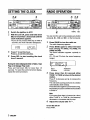
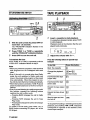
SETTING THE CLOCK
2,4
1
3
3 1,2
4
Switch the ignition to ACC.
2 With the unit off, press and hold down
SELfor more than 1.5 seconds until the
clock indication appeara.
●
If you do not proceed with step 3 within 5
seconds, the clock indication disappears.
(
TAPE
CD
You can turn the unit on by pressing any button
except & 4, <
and on the front panel.
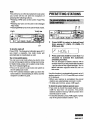
1 Press BAND to turn the radio on.
The radio frequency appears.
)
2 Press BAND again to select the band
from among F1 (FM1), F2 (FM2), F3
(FM3) and AM.
3
Press v to set the hour.
Press A to set the minutes.
4
Press SEL to start working the clock
from 0 second.
The band indication appears cyclically in
order.
(F1, F2 and F3 share the same frequency
range.)
J
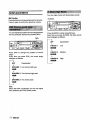
Havingtheclockdisplayedwhiiein Redio,Tape
Piayor CDChangerPiaymode
Press and hold down SEL for more than 1.5
seconds. To return the unit to its former display,
repeat the same procedure.
Band
indication
3
Frequency
indication
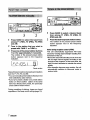
Press (moer than 0.5 second) either
TUNE V orTUNE Atotuneinthedesired
station.
Press 1 to decrease and A to increase the
frequency.
The unit starts scaning and tunes in a station
automatically (Seek tuning).
Press the button again to cancel Seek tuning.
Repeat the procedure untii the desired station
is tuned in.
Note
If you press (less than 0.5 second at a time)
either TUNE Y or TUNE A, the frequency
decreases or increases step by step.
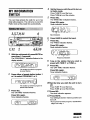
4 Adjust the volume with i-l-.
Toturnthe unitoff
Press PWR.
5
ENGLISH