1
Installation Instructions: Roadrunner 040 EAGLE 100/AM-3000M/VME Upgrade
Page 1-9
1.7.2SCSI Bus and SASI Bus Compatibility
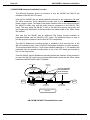
In most cases, you will be attaching your SCSI peripherals to the high performance
SCSI port on the Roadrunner board. However, the Roadrunner hardware also supports
SCSI peripherals connected to the SASI port on AM-3000 VME systems (AM-185 &
AM-185-50 CPU boards), and on standard (NON AM-540 modified) AM-3000M/LC
systems (AM-140 CPU boards).
If you wish to use your existing SASI/SCSI-1 hard drive as the boot drive on the old
SASI port, then you must also attach any other peripheral devices to the SASI port as
well. And, conversly, if you attach the boot drive to the enhanced SCSI port on the
Roadrunner, then you must attach any other SCSI peripheral devices to that port also.
It would make little sense to have your SCSI boot drive and peripherals connected
to the CPU SASI port. One of the main advantages of the Roadrunner upgrade is
approximately three times the throughput of its SCSI port, compared to the old CPU
SASI port! Additionally, the SCSI command and the high-performance SCSI
Dispatcher can only detect and enhance devices which are connected to the
Roadrunner’s SCSI port!
If necessary, you may attach a hard disk drive to the opposite port and access it as a
sub-system drive. You would use the FIXLOG program to create the new sub-system
driver. If the drive is attached to the SASI port you would imbed the generic
SCZDVR.DVR to create the new driver. If the drive is attached to the Roadrunner’s SCSI
port you would imbed the generic SCZRR.DVR to create the new driver.
1.8SCSI DISPATCHER
In order to use the Roadrunner’s on-board high performance SCSI controller, you must
define the "SCSI Dispatcher" in your system initialization command file. AMOS uses the
dispatcher to communicate with the SCSI controller chip. All communications with the
SCSI controller chip are handled by the dispatcher.
There are two versions of the SCSI dispatcher. SCZRR.SYS is a high performance SSD
protected version of the SCSI dispatcher, which supports command queueing,
synchronous transfers, multi-threaded, and scatter-gather operations. SIMRR.SYS is a
simplified version of the SCSI dispatcher, which is not SSD protected and does not
support the high performance features supported in SCZRR.SYS. SIMRR.SYS is used
when making warm boot tapes and for temporary situations with computers which do
not have an SSD chip; it is not intended for normal operation. While both of these
dispatchers support SCSI devices, there is a tremendous performance increase using
the SCZRR.SYS dispatcher.
The PIC code for the SCSI dispatcher must be purchased separately from Alpha Micro.
See Appendix C for information on how to install the SCSI dispatcher and its PIC code.
If you have any SCSI peripherals attached to the Roadrunner’s SCSI port, you must
define the dispatcher in your boot INI, regardless of whether you are using SCSI-1 or
SCSI-2 peripheral devices.
PDI-00172-60, Rev. A02