1
3.2 I nstalling ASUS certified CPU heatsink
and fan assembly
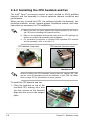
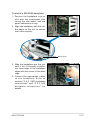
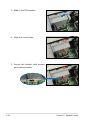
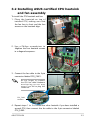
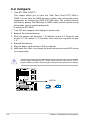
To install the CPU heatsink and fan:
1. Place the heatsink on top of
installed CPU, making sure that
the fan face to front and the four
screws on the heatsink align.
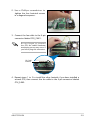
2. Use a Philips screwdriver to
tihghten the four heatsink screws
in a diagonal sequence.
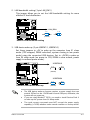
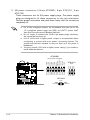
3. Connect the fan cable to the 4‑pin
connector labeled CPU_FAN1.
Do not forget to connect
the CPU fan cable! Hardware
monitoring errors may
occur if you fail to plug this
connector.
CPU_FAN1
connector
4. Repeat steps 1 to 3 to install the other heatsink if you have installed a
second CPU, then connect the fan cable to the 4‑pin connector labeled
CPU_FAN2.
ASUS TS500-E4
3-