1
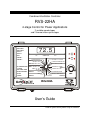
RVS-22HA User’s Guide
De-Icing Cycle Time (Message: “Cyc”)
This parameter, visible if DIP switch # 11 (de-icing option) is set to ON, establishes the
length of time during which stage 2 de-icing is inactive. If stage 2 stays deactivated for a
longer period of time than De-Icing Cycle Time, stage 2 is activated at minimum speed for
De-Icing On Time. This parameter is adjusted in 1-minute increments, from 1 to 720
minutes.
De-Icing On Time (Message: “On”)
This parameter, visible if DIP switch # 11 (de-icing option) is set to ON, establishes the
length of time during which stage 2 de-icing is active. During de-icing, stage 1 becomes
deactivated during the time specified in the present parameter. If stage 2 stays deactivated
for more than De-Icing Cycle Time, stage 2 is activated at minimum speed for De-Icing On
Time. This parameter is adjusted in 1-second increments, from 0 to 900 seconds.
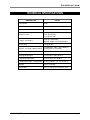
Motor Type (Message: “tyP”)
This parameter allows the user to choose the motor type for stage 2. The right motor type
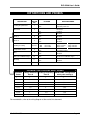
ensures correct supply voltage at a given speed. Refer to the motor type table for the list of
available motor types.
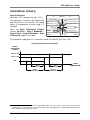
DIFFERENTIAL (STAGE 4)
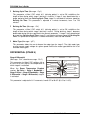
Stage 4 Differential
(Message: “St 4”; absolute message: “St 4”)
This parameter, invisible if DIP switches # 6 or
# 9 are set to ON, adjusts the temperature at
which stage 4 is activated.
ALARM OFFSETS
HEAT 1
HEAT 2
MIST
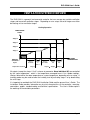
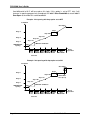
When the Room Temperature Readout
reaches Set Point + Stage 1 Bandwidth +
Stage 2 Offset + Stage 2 Bandwidth + Stage
3 Differential + Stage 4 Differential, stage 4
is activated.
ROOM TEMP.
MIN
MAX
SET POINT / T°CURVE
OFFSET / DIFF.
CURRENT RAMPING DAY
OFFSET / DIFF.
MIN. SPEED / CURVE
OFFSET / DIFF.
BANDWIDTH / TIMER
STAGE 1
HUMIDITY MIN / MAX
(SEC.)
TIMER ON
OFF (MIN.)
STAGE 3
DIFF.
DIFF.
STAGE 4
RH COMPENSATION
OFFSET / BANDWIDTH
MIN. SPEED
STAGE 2
This parameter is adjusted in 0.1° increments, from 0.5°F to 20.0°F (0.3°C to 11.0°C).
Page 14
RAYDOT Ventilation Control