1
INDEX
1. Getting Started .............................................................................................................................. 4
About......................................................................................................................................... 4
Feature Highlights ..................................................................................................................... 4
2. Set up the Phone ........................................................................................................................... 4
3. Phone User Interface..................................................................................................................... 6
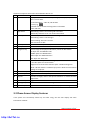
3.1 Hardware Component Instructions ..................................................................................... 6
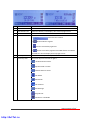
3.2 Phone Screen Display Features ........................................................................................... 7
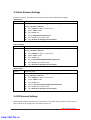
3.3 Basic Network Settings........................................................................................................ 9
3.4 SIP Account Settings ............................................................................................................ 9
3.5 Basic Features ................................................................................................................... 11
3.5.1 Making a Call .......................................................................................................... 11
3.5.2 Anonymous Call ...................................................................................................... 11
3.5.3 Redial ...................................................................................................................... 11
3.5.4 Call Log ................................................................................................................... 12
3.5.5 Making Calls to Contact.......................................................................................... 12
3.5.6 Multi-lines to Answer the Call ................................................................................ 13
3.5.7 Auto-Answer .......................................................................................................... 13
3.5.8 Ending a Call ........................................................................................................... 13
3.5.9 Using Hold and Recover (Switch Calling Line) ........................................................ 14
3.5.10 Transferring Calls .................................................................................................. 14
3.5.11 Using Mute ........................................................................................................... 15
3.5.12 Do Not Disturb ..................................................................................................... 15
3.5.13 3-way Conference................................................................................................. 16
3.5.14 Voice Mail ............................................................................................................. 16
3.6 Advanced Settings ............................................................................................................. 17
3.6.1 Using the phone book ............................................................................................ 17
3.6.2 Using Call Logs ........................................................................................................ 20
3.6.3 Peer-to-Peer ........................................................................................................... 20
3.7 Keypad Setting................................................................................................................... 20
3.7.1 Language Setting .................................................................................................... 21
3.7.2 Message ................................................................................................................. 21
3.7.3 Time & Date ........................................................................................................... 21
3.7.4 Ring Tone and Volume Setting................................................................................ 22
3.7.5 Searching Phone Book............................................................................................ 22
3.7.6 Cannot Set the Features with Keypad .................................................................... 23
4. WEB User Interface ..................................................................................................................... 23
Main Interface-Phone Status .................................................................................................. 23
4.1 Net Work ........................................................................................................................... 24
4.1.1 LAN Port ................................................................................................................. 24
4.1.2 PC Port .................................................................................................................... 26
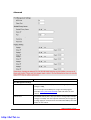
4.1.3 Advanced ................................................................................................................ 27
www.escene.cn/en/
Escene Communication
http://ArtTel.ru