1
Appendix A - Optional 100Base-FX module
The 100Base-FX module is an optional module which enables connectivity (as
the thirteenth port) using multi-mode duplex 62.5/125 fiber-optic cable. Fiberoptic cable provides better immunity to electromagnetic interference and supports longer cable lengths compared to copper wire. The 100Base-FX module
may be used to connect the hub to either a 100Base-FX workstation or another
100Base-FX hub. The maximum cable length for a workstation connection is
1350 feet (412 meters). The maximum cable length for a hub connection is 688
feet (210 meters).
Installing the 100Base-FX module
The 100Base-FX module is an option to allow the FHX1200 Stackable hub to
support fiber-optic cable. Follow the directions below to install the 100Base-FX
module.
1.
2.
3.
Disconnect the hub from the electrical outlet.
Place the hub on a flat and steady surface.
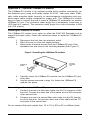
Remove the 4 bracket screws from the 100Base-FX port of the
stackable hub and remove the mounting bracket (See Figure 7).
Figure 7 Installing the 100Base-FX module
FHX1200
Stackable
Hub
100Base-FX
Module
4.
5.
Carefully insert the 100Base-FX module into the 100Base-FX port
of the hub.
Use the screws removed in step 3 to fasten the 100Base-FX
module into place.
Connecting cables to the 100Base-FX port
1.
2.
Connect one end of a fiber-optic cable into the TX connector of the
first hub. Connect the other end of this cable into the RX connector
of the second hub.
Connect one end of a second fiber-optic cable into the RX connector of the first hub. Connect the other end of this cable into the TX
connector of the second hub.
Do not connect fiber-optic cables from TX to TX or RX to RX on different hubs.
6