1
SETUP
Unpacki ng
The 516-II DMX to 0-10 V Converter comes with the following items. Please
check the contents and verify that nothing is missing or damaged.
• 516-II DMX to 0-10 V Converter
• 5 meter 3-pin XLR data cable
• this user manual
Operati ng modes
OPERATING MODE OPTIONS
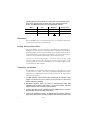
The 516-II DMX to 0-10 V Converter has 2 DMX modes and 1 Martin mode.
In DMX mode 1 the 516-II DMX to 0-10 V Converter performs as an analog
dimmer, converting 8-bit digital levels to voltages between 0 an 10 V. The
converter requires 16 DMX channels - 1 per output - in this mode.
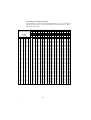
In DMX mode 2 the 516-II DMX to 0-10 V Converter performs as a switch pack,
toggling devices on and off, by converting DMX signals to 0 or 10 V. The
converter requires just 2 DMX channels in mode 2 - each bit controls one output
channel.
In Martin mode the 516-II DMX to 0-10 V Converter performs as an analog
dimmer, as in DMX mode 1, but is for use with Martin RS-485 controllers such as
the 3032 and the 2308. The converter requires 1 Martin channel.
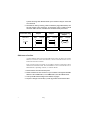
DMX MODE SETUP
The converter automatically switches to the selected DMX mode when used with
DMX controllers. The factory default is DMX mode 1, the dimmer mode. To
change DMX mode,
1 Disconnect the converter from power. Remove the top cover, which is
secured by 1 screw on each end and 3 screws on the back.
2 Locate the jumper at PL113 on the small circuit board.
3 To select DMX mode 2, place the jumper on pins 1 and 2. Pin 1 is marked and
is closest to the front panel. To select DMX mode 1, remove the jumper and
store it by placing on pin 1 only.
4 Replace the top cover before applying power.
4
Setup