1
EPSON Perfection 640U
Using EPSON TWAIN
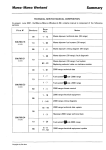
Click Manual Mode to open the EPSON TWAIN L settings
dialog box:
When you scan with EPSON TWAIN, you see the Automatic
Scanning window.
Select the resolution
Select your image type
If you want, you can let the TWAIN driver automatically scan
your document. It detects what type of document you’re
scanning and automatically chooses the optimum settings for
your scan.
To scan in manual mode and adjust your scan settings, click
Cancel.
You see the following window:
Click to return to
Full Auto Mode
Preview your scan here
4. Make the changes you want to adjust the image, then click
the Scan button.
To switch back to Full Auto mode, click the Full Auto Mode
button.
Depending on the image you want to scan, you may not
get the expected scanned image. In this case, scan the
image in Manual mode.
4 - EPSON Perfection 640U
10/00