1
Navigating
your handheld
Typing
and editing
Lock the handheld
Set a password > Click the
Lock icon
Capitalize a letter
Hold the letter
Insert a period
Press
Lock the keyboard
Click the Keyboard Lock
icon (only available if you
have not set a password)
Type the alternate
character on a key
Press
Move the cursor
Roll the trackwheel or Press
+ Roll the trackwheel
Insert an accented
character
Hold a letter + Roll the
trackwheel
Return to previous screen
Press the Escape button
Insert a symbol
Press
> Click a symbol or
Press a letter
Click an item
Highlight the item > Click
the trackwheel
Select text
Press
> Roll the
trackwheel
Select multiple items
Hold
+ Roll the
trackwheel
Select characters
Hold
> Roll the
trackwheel
Go to the top of a screen
Press
Copy selected text
Go to the bottom of a
screen
Press
Press
+ Click the
trackwheel or Click the
trackwheel > Click Copy
Turn on/off the handheld
Hold
Paste selected text
Turn on/off backlighting
Press
Press
+ Click the
trackwheel or Click the
trackwheel > Click Paste
Cut selected text
Press
+
or Click
the trackwheel > Click Cut
Cancel selection
Press the Escape button
Wireless network coverage
To turn the wireless radio on or off, click Turn
Wireless On/Turn Wireless Off.
Wireless coverage
No wireless coverage
Emergency calls
SMS messages
Phone
Email and PIN messages
Browser
twice
+ the key
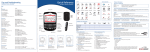
Status indicators
battery power
low battery power
charging
roaming
Home Zone
receiving data
transmitting data
service book
waiting
Bluetooth® radio
on
Bluetooth
connected
Location Based
Services
voice privacy
TTY enabled
voicemail
message
missed call
alarm set
Number lock on
Shift lock on
Alt mode on