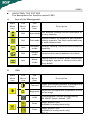
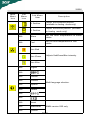
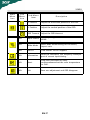
1
X163H HOW TO ADJUST A SETTING
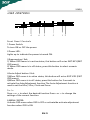
1. Press the MENU-button to activate the OSD window.
2. Press < or > to select the desired function.
3. Press the MENU-button to select the function that you want to adjust.
4. Press < or > to change the settings of the current function.
5. To exit and save, select the exit function. If you want to adjust any other
function, repeat steps 2-4.
·
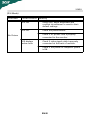
P/X Series OSD behave
When user press “MENU” button on front bezel
A
B
A.
B.
Acer eColor Management
If selected to “Acer eColor Management “ item, will appear the
Acer eColor” OSD
USER
If selected to “USER” item, will appear the Standard OSD
I. Only Analog Input Model
II. Only Dual Input Model
EN-14