1
BN68-00801B-00Eng.qxd
1/31/04 3:11 PM
Page 2
G E N E R A L I N F O R M AT I O N
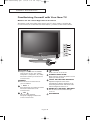
Familiarizing Yourself with Your New TV
Buttons on the Lower-Right Part of the Panel
The buttons on the lower-right panel control your TV’s basic features, including the
on-screen menu. To use the more advanced features, you must use the remote control.
SOURCE
(POWER)
Displays a menu of all of the available
input sources (TV, AV1, AV2, S-Video,
Component 1, Component 2, PC, HDMI).
Also used to confirm your choice on the
on-screen menu.
Press to turn the TV on and off.
POWER INDICATOR
Blinks and turns off when the power is on and
lights up in stand-by mode.
LIGHT DETECTING SENSOR
MENU
Adjusts the brightness of the screen
automatically by detecting brightness of the
surrounding environment. This sensor works
when the Brightness Sensor is on.
Press to see an on-screen menu of
your TV’s features.
– VOL +
Press to decrease or increase the volume.
Also used to select items on the
on-screen menu.
CH
REMOTE CONTROL SENSOR
Aim the remote control towards this spot
on the TV.
SPEAKERS
Press to change channels.
Also press to highlight various items
on the on-screen menu.
English-2