1
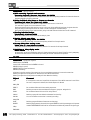
Contents
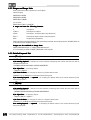
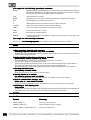
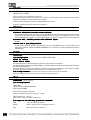
1 Introduction .......................................................................................................................... 6
1.1
1.2
1.3
1.4
1.5
1.6
1.7
1.8
2 Setup
2.1
2.2
2.3
2.4
2.5
2.6
2.7
2.8
2.9
2.10
2.11
2.12
2.13
2.14
2.15
2.16
General Information .................................................................................................................................................... 6
General Comments ...................................................................................................................................................... 6
Specifications................................................................................................................................................................. 7
Installation ..................................................................................................................................................................... 7
Safety Requirements (Important, read carefully!) ............................................................................................ 8
General Safety Instructions ...................................................................................................................................... 9
Layout and Controls .................................................................................................................................................. 10
Quick Reference ......................................................................................................................................................... 18
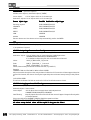
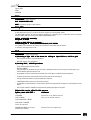
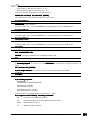
....................................................................................................................... 2 1
Selecting, patching, creating and editing of fixtures and dimmers, Stage Setup (Edit Show) .......21
Full Access or Live Access menu ........................................................................................................................... 22
DMX List -Single Channel-specific Adjustments for the Current Show ................................................ 28
Adjustments in the ATTRIBUTE SETUP menu .................................................................................................... 31
Modifying Scanners (FIXTURE TYPES) ................................................................................................................. 36
FIXTURES TYPES (create new) .............................................................................................................................. 38
Function Sets - Names (Channel Values) and Presets ................................................................................. 40
Creating, Assigning and Deleting Profiles ......................................................................................................... 42
DMX Output and Ethernet Configuration ........................................................................................................ 44
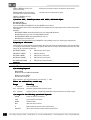
DMX Output Window .............................................................................................................................................. 50
Auto Create - Creating presets, effects and group keys automatically .................................................. 52
Settings in the Setup Menu .................................................................................................................................. 56
Settings in the DEFAULTS Menu .......................................................................................................................... 58
Setting Sound Signals ............................................................................................................................................. 60
TIME & DATE Menu ................................................................................................................................................... 61
User Management .................................................................................................................................................... 62
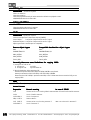
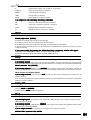
3 Creating a Show ............................................................................................................... 66
3.1
3.2
3.3
3.4
3.5
3.6
3.7
3.8
3.9
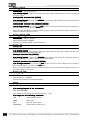
CREATING A WINDOW ............................................................................................................................................. 66
Storing VIEWS .............................................................................................................................................................. 70
Creating and calling up Fixtures and Dimmer GROUPS ............................................................................... 72
Accessing Fixtures directly (in the FIXTURE SHEET) ....................................................................................... 74
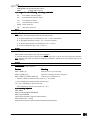
Accessing Dimmer Channels directly (in the CHANNEL SHEET) ................................................................ 82
Colours used in the FIXTURE, CHANNEL and FADER window ..................................................................... 89
Creating and calling up Presets ............................................................................................................................ 90
Deleting Groups, Sequences, Views etc. ............................................................................................................ 95
MAtricks ....................................................................................................................................................................... 96
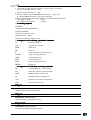
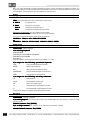
4 Cues and Sequences ......................................................................................................... 98
4.1
4.2
4.3
4.4.
4.5
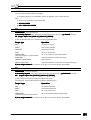
Creating Cues (separate memories) .................................................................................................................... 98
Programming Sequences ...................................................................................................................................... 102
Editing Sequences ................................................................................................................................................... 106
Editing Chasers ......................................................................................................................................................... 112
Updatings Cues ......................................................................................................................................................... 115
5 Executing Cues, Sequences and Chasers ................................................................ 117
5.1
5.2
5.3
5.4
5.5
5.6
6 Effects
6.1
6.2
6.3
6.4
6.5
6.6
6.7
4
ASSIGN menu (Assignment to EXECUTOR) ........................................................................................................ 117
Small EXECUTOR Window ....................................................................................................................................... 124
EXECUTOR Sheet ....................................................................................................................................................... 125
TRACKING Sheet ........................................................................................................................................................ 126
Page Administration ................................................................................................................................................. 128
OFF menu (RUNNING PROGRAMS) ...................................................................................................................... 130
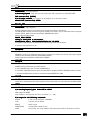
..................................................................................................................... 13
1
131
Effect Pool ................................................................................................................................................................... 131
Editing Effect Groups ............................................................................................................................................... 132
Executing an Effect Group ..................................................................................................................................... 136
Customizing an Effect Group ................................................................................................................................. 137
Effect Groups in Cues .............................................................................................................................................. 138
View ALL RUNNING EFFECTS menu ...................................................................................................................... 139
Creating and Storing Virtual Forms (EDIT FORMS) ...................................................................................... 140
MA Lighting Technology GmbH . Dachdeckerstr. 16 . D-97297 Waldbüttelbrunn . www.malighting.de eMail: info@malighting.de