1
To perform a directory search:
1. Dial the voice mail number.
2. Say “Directory” or press # .
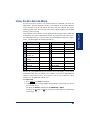
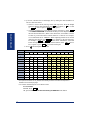
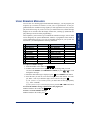
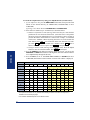
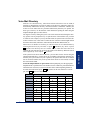
3. Say the last name of the person you are searching for or press the appropriate
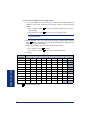
dialpad buttons to spell the name (see page 71).
If 10 or fewer matches are located, you can access and browse the list immediately (see step 4.)
If the list contains more than 10 matches, you have the option to browse or filter
the list. (skip step 4. and see step 5.)
4. If 10 or fewer matches are located, you have the following options:
MOVING ON
• Say “Yes” or press # to accept the name that is played.
• Say “Previous” or press 1 to browse to the previous name in the list.
• Say “More” or press 2 to hear more information about the subscriber.
• Say “Next” or press 3 to browse to the next name in the list.
• Say “New” or press 4 to search for a new name.
• Say “Cancel” or press * to exit the directory.
5. If more than 10 matches are located, the system prompts you to browse or filter
the list. Do one of the following:
• Say “Yes” or press 1 to browse the list. (See step 4. for options).
• Say “No” or press 2 to select the filter option and then respond to one of
the following filter questions:
– The system begins by asking you if the name you are searching for is the
last name. If it is, say “Yes,” press 1 , say the last name, or spell the last
name.
– If you did not respond to the first question, the system asks if the name
you are searching for is the first name. If it is, say “Yes,” press 1 , say
the first name, or spell the first name.
After the list has been filtered by first or last name, a smaller list of names is
returned. You can then browse the list and select the appropriate name (see step
4.)
72
Inter-Tel® Model 8560/8660 User Guide