1
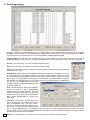
C. Event Programming
Connect: Located in the “Event Programming” screen’s “Tools” pull down menu. This feature allows you to select the PC Com port
the CTG-2 is connected to for On Line programming of the CTG-2. This is normally used if you are programming “Off Line” (CTG-2
not connected to PC) then want to connect to the unit and upload the updated programming data.
Change Unit Name: Located in the “Event Programming” screen “Tools” pull down menu, this is useful if you have several units in
multiple locations with the same “dat” file. For single unit applications we recommend using the “dat” file name for the unit name.
New File: Select this to open a new Event Programming dat file (right).
Open: Select this to open an existing Event Programming dat file (right).
Import: Select this when opening an existing Event Programming dat file that was previously programmed
from a different PC (right).
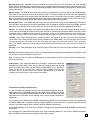
Add/Edit Event: Add each of your events by double clicking on any field in the next available event (except
the event number field). This opens the “Edit Event” screen that is used to program or edit the one specific event (below right). If using multiple schedules and you wish to copy a complete schedule, see “Block
Edit” on page 12. If using multiple schedules and the Calendar mode, you can disregard the “start date”
and “stop date” when programming your events. Once all of your events and schedules are programmed,
you can use the Calendar mode to decide which
schedule is running each day and to disable tones on
weekends, holidays, etc.
Task: This pull down menu allows you to program a
specific event such as to play a preprogrammed
(uploaded) wave file, Change Schedule, turn the Aux
relay on or off, activate a timed Aux relay, activate an
automatic Time Sync on a specific time and/or date or
Start a System Disable/Enable at a specific time
and/or date.
Time Sync: Located under “Task” pull down menu.
This is for programming an automatic ACTS atomic
clock synchronization event. This does require a
phone line or an analog station port of a phone system
on terminals 1 & 2. The CTG-2’s internal clock accuracy is +/- 2ppm or approximately +/- 63 seconds per yr. This accuracy can be greatly increased by programming Time Sync events
once per month, etc. We recommend programming the Time Sync Start Time for after hours and at an odd time to help prevent busy
signals from ACTS or busy shared line issues.
10
Duration: For a timed Relay event, this box sets the length of time the auxiliary relay will be actuated.