1
Appendix
Troubleshooting
If you have difficulty with your telephone, please try the suggestions below.
For customer service, visit our website at www.vtechcanada.com or call
1 (800) 267-7377.
My telephone does not work at all.
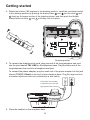
• Make sure the power adapter is securely plugged into an electrical outlet
not controlled by a wall switch (page 7).
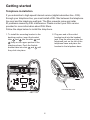
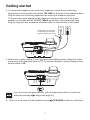
• Make sure the telephone line cord is plugged firmly into the TEL LINE jack
on the telephone base and the telephone wall jack (page 7).
• Unplug the electrical power to the telephone base. Wait for approximately
15 seconds, then plug it back in.
• Disconnect the telephone base from the telephone wall jack and plug in
a working telephone. If the other telephone does not work, the problem is
probably in the wiring or the local service. Call your telephone service provider.
There is no dial tone.
• First, try all the above suggestions.
• The telephone line cord may be malfunctioning. Install a new telephone
line cord.
• Disconnect the telephone base from the telephone wall jack and connect a
different telephone. If there is no dial tone on this telephone either, the problem
is in your wiring or local service. Contact your telephone service provider.
I cannot dial out.
• First, try all the above suggestions.
• Make sure there is a dial tone before dialing. Wait an extra second before
dialing.
• If other telephones in your home are having the same problem, the problem
is probably in the wiring or local service. Contact your telephone service
provider (charges may apply).
• Eliminate any background noise. Mute the telephone before dialing, or dial
from another room in your home with less background noise.
44