1
Operation
Figure 4
Grill
Open
Here
D
F E
A
B C
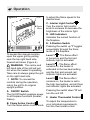
To access the manual controls,
open the upper grill by pulling,
near the top right hand side,
forward and down (Figure 4).
WARNING: The centre and
left hand side of the grill will get
hot when the heater is operating.
Take care to always grasp the grill
on the right hand side.
! NOTE: To conceal the
controls during the operation,
return the grill to its original
upright position.
A. ON/OFF Switch
The On/Off Switch supplies power
to all fireplace functions (Heater/
Flame).
B. Flame Action Control
Turn the flame action control knob
to adjust the flame speed to the
desired level.
C. Interior Light Control
Turn the interior light control
knob to increase or decrease the
brightness of the interior light.
D. LED Indicators
Indicates the current function of
the fireplace.
E. 3-Position Switch
Pressing the switch up "I" toggles
sequentially through the three
levels of the fireplace.
Level 1
: The flame effect
is turned on and the first red
indicator light is activated.
Level 2 : The flame effect
remains on, the heater is
activated to the low heat setting,
and the first and second red
indicator lights are activated.
Level 3 : The flame effect
remains on, the heater is set to
the high heat setting, and all three
red indicator lights are activated.
Pressing the switch down "II" will
turn the unit Off.
F. Heater Thermostat Control
To adjust the temperature to
your individual requirements,
turn the thermostat control
11