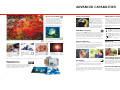
1
Direct Print System
True One-Touch Printing/Transfer
ID Photo Print
Movie Print
While many PowerShot camera users will
transfer their images to a personal computer
for electronic distribution or printing via
an image editing program, many will also
enjoy the convenience of the computerless Direct Print System.
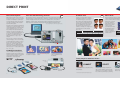
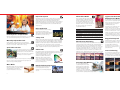
New PowerShot cameras* with the Print/Share button make it easier than ever before to
print photographs or transfer image files to a Windows computer directly. Now, when the
camera is in playback mode and connected to a compatible Canon photo printer or
PictBridge compliant printer, the Print/Share button will light blue. This tells the user
he/she can print or transfer the image being viewed simply by pressing the button.
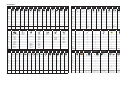
PowerShot cameras with the ID Photo
Print feature enable users to make ID
size prints directly on a Canon Card
Photo Printer. This feature permits the
user to crop the recorded image to the
required area and provides a choice of
up to 28 different sizes for printing.
The number of ID photos that are
printed, for example, on a single 4" x 6"
sheet will depend on the selected
photo size.
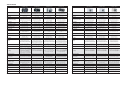
Another useful direct print capability built into new PowerShot
cameras is the Movie Print feature. It works with a connected
Canon Card Photo Printer to create an index print of individual
frames from a recorded
movie. The number of
printed stills per sheet
depends on the paper
size. The camera
automatically calculates
the interframe interval
based on the length
of the movie and the
Paper Size
Number of Images
number of stills required
Credit Card
20 (4 x 5)
Postcard (4˝ x 6˝)
63 (7 x 9)
to fill the sheet.
* S500, S410, SD110, A75 and A310. As of Spring 2004.
PowerShot cameras with Direct Print Mode
enable users to connect directly to one of
several outstanding Canon Photo Printers.
Choices include the CP-200/300 Card
Photo Printer, which prints brilliant, longlasting 4" x 6" prints in as quickly as 85
seconds or credit-card size prints in about
40 seconds. It’s small enough to be
portable, too, powered via an optional
battery pack (CP-300 only) or a car
adapter.
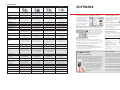
Image Size
(Long Side x Short Side)
2.0 x 2.0 inch
1.8 x 1.5 inch
1.8 x 1.4 inch
Canon PowerShot cameras support the
PictBridge standard, which enables direct
printing connections between any compliant
camera and printer regardless of the
manufacturers of the equipment.
Postcard (4˝ x 6˝)
Portrait
Landscape
2
2
4
4
4
4
Paper Print Types
Users can also connect most PowerShot
cameras directly to one of Canon’s highly
acclaimed Direct Photo Printers —such as
the i900D and i960 Photo Printers; the
i475D, i560, and i860 Desktop Photo
Printers; and i80 Color Bubble Jet Printer.
All produce outstanding photo-lab-quality
prints up to 8.5" x 11" at resolutions up to
4800 x 1200 dpi.
PictBridge Compliant
Credit Card
Portrait
Landscape
1
1
1
1
1
2
Exclusive Technologies
DIRECT PRINT
Print/Share button.
4˝ x 6˝ (Bubble Jet or CP-200/300)
5˝ x 7˝ (Bubble Jet i900D, i475D, & i80 only)
CONNECT
Connect the camera to
the printer or computer.
PRESS
PRINT/SHARE
Press the LIGHTED Print/Share
button.
You'll have quick and easy
prints or share them across
the internet.
”
Credit Card Size
(CP-200/300 only)
8.5˝ x 11˝ (Bubble Jet only)
Credit Card-Sized Label
(CP-200/300 only)
Mini Label
(CP-200/300 only)
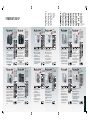
3 Easy Steps for Fabulous Prints*
Photo Printer
i900D
CONNECT
Connect the camera to the printer using
the USB Cable.
Card Photo Printer
CP-300 and CP-200
SELECT
Select the desired image and print size
right on your PowerShot camera using the
LCD menu. Choose bordered or borderless.
You can even crop the image to your liking.
PRINT
Press the camera’s set button and print
the photo. In minutes, you’ll have a crisp,
full-color picture.
* For PowerShot models without Print/Share button.
8
9