1
QIP2500 User Guide
CONNECTING YOUR QIP2500
Standard TV Cabling
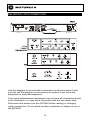
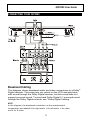
Use 75-ohm coaxial cables to connect your set-top to a standard TV.
This is the most common cable connection and it provides all of the basic
features of the QIP2500.
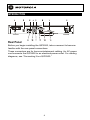
If you connect the coaxial cable to the TO TV/VCR connector on the set-top
and to the coaxial CABLE IN connector on the TV, you must tune your TV
to channel 3 or 4.
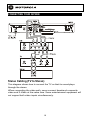
The method shown will not provide stereo audio. Connect the set-top to
the TV using standard RCA audio cables (left and right) to receive stereo
audio on all channels, when available.
11