1
Hardware Maintenance
Maintenance
If the Summit WM20 experiences any problems and Extreme Networks technical support has
determined that the unit needs to be replaced, ship the defective unit to Extreme Networks per the
RMA instructions.
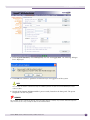
Backing up the Summit WM20 Controller’s system configuration
You can back up the Summit WM Controller’s system configuration. You can also define the automatic
schedule backups to occur. While defining a scheduled backup, you can configure to have the backup
copied to an FTP server. The backup will be copied to the FTP server after the backup is completed on
the local drive. For more information, refer to the Summit WM20 User Guide.
WARNING!
Whenever you change the system configuration, you must always define the automatic schedule backup to be copied
to the FTP server. If this not done, you may not able to retrieve the system configuration in the event of HDD
failure.
Power and maintenance procedures for the Summit WM20
Controller
This section provides procedures to power off and power on the system when performing maintenance.
NOTE
Check the wrist strap weekly to ensure proper ESD protection.
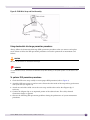
To test the ESD wrist strap using a DMM:
1 Set the ohmmeter to 2-megohm resistance (see Figure 9).
2 Connect the DMM black lead to the alligator clip at the end of the cord.
3 Contact the DMM red lead to the plate on the inner surface of the wrist strap.
4 Check the resistance reading on the meter. The meter reading must be between 0.80 and 1.20 mega
ohms.
5 Replace the wrist strap and cord assembly if the reading is not within the allowable range.
64
Summit WM20 Technical Reference Guide, Software Version 4.2