1
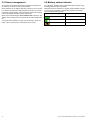
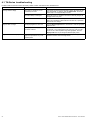
4.1 TH-Series troubleshooting
Problems with the thermal camera and their possible causes and solutions are described here.
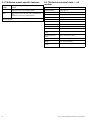
Problem
Possible causes
Possible solutions
No image visible on display.
The camera is switched off, or has
automatically shut down.
If no buttons are pressed for approximately 5 minutes, the camera will shut
down automatically. To switch on, press the Power button. The camera
will be ready to use in approximately 4 seconds.
The internal battery is discharged.
Charge the camera, as described in this manual. When fully charged, the
charging indicator is lit green.
The lens cover has not been removed.
Remove the lens cover from the objective lens on the front of the camera
while in use. Remember to replace the lens cover after use, to protect the
objective lens from damage.
The display brightness is set too low.
Press the Display brightness button several times to select an appropriate
brightness level.
The display mode is not appropriate for
the current conditions.
A particular environment may benefit from a different display mode setting.
For example, a very cold background (such as the sky) could cause the
camera to use a wider temperature range than appropriate. Press the
Display mode button to cycle through the different display modes.
The camera was pointed at an intense
light source (such as the sun), for an
extended period.
Image artifacts will disappear in time. The camera periodically performs
automatic corrections to remove image artifacts.
Image too dark or too light.
Image artifacts visible on display.
22
TH24 / TH32 handheld thermal cameras – User reference