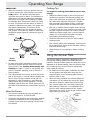
1
Operating Your Range
About the Various Cooking Modes
Convection Bake
In standard bake mode, the bottom heat
element provides conventional baking heat.
Temperatures may be set from 135˚F to
555˚F in 5˚F increments. Use standard bake for
single rack baking and roasting.
In this combination convection-radiant mode,
the lower element provides the heat. As in
Pure Convection mode, the convection fan
and baffle combine to circulate heated air evenly
throughout the oven chamber. Temperatures may be
set from 135˚F to 555˚F in 5˚F increments. Use this
mode for single rack baking, multiple rack baking
and roasting.
Standard Broil
Pre-Heat Cycle
Standard Bake (Selected Models Only)
The infrared ceramic gas broiler supplies the
heat in Broil mode. The broil temperature
is adjustable from 135˚F to the HI setting
(equivalent to 555˚F) for greater cooking flexibility.
Broiling is always performed with the door closed.
The oven features an automatic pre-heat cycle that
rapidly brings the oven chamber up to temperature.
Simply by choosing a cooking mode and setting a
temperature, the oven will automatically perform
the pre-heat function. Pre-heat operates in standard
bake, Pure Convection and convection bake modes.
There is no pre-heat cycle for the broil mode.
Pure Convection™ (ERD models only)
Your new oven has the best cooking system
available today, Pure Convection™. Pure
Convection is a total system approach to
cooking. Pure Convection allows multi-rack cooking while achieving even results from one rack to
another.
Basic Oven Operation
Follow these steps to operate the various oven
modes:
1. Position the oven rack(s) at the proper height(s).
In Pure Convection mode a third heating element,
encircling the convection fan, is located in the rear
of the oven chamber behind a baffle.
2. Press the touch key for the mode of your choice.
The oven will beep once, the selected cooking
mode will flash, and “– – –” will be displayed.
• The convection fan draws air from the oven
chamber, then forces it across the hot convection
heating element. The heated air is directed back
into the oven chamber through the convection
baffle.
3. Press either the + or – key. The default temperature will be displayed.
4. To adjust the default temperature for baking,
press and hold the TIME • TEMP key. (Press
+ key to increase the temperature setting, – to
decrease).
• The baffle distributes the heated air evenly to
ensure uniform results. It also separates the
food from the heat source and channels the air
evenly into the oven eliminating any hot or cool
spots.
5. “PRE” and “ON” and the selected cooking
mode will appear in the clock display. The oven
will begin to heat. If in a convection mode,
the convection fan will turn on. Also, the clock
display will change from the desired cooking
temperature to the actual oven temperature,
starting with 135˚F. The temperature display
will increase in 5˚F increments until the desired
temperature is reached. The cooling fan will turn
on when the oven temperature reaches 200˚F.
• The convection filter, in the back of the oven,
eliminates the transference of flavors when
cooking entire meals and keeps the oven
cleaner.
IMPORTANT: Do not place food inside the oven
until the pre-heat cycle is complete (there is no preheat cycle in broil mode). Continued...
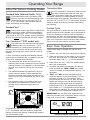
AIR FLOW
BAKE
ON
Temperatures may be set from 135˚ to 555˚F
in 5˚F increments. Use this mode for single rack
baking, multiple rack baking, roasting and preparation of complete meals.
TIMER 1
CLOCK
STOP TIME
TIMER 2
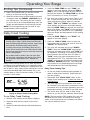
Example of Display in Bake Mode
7