1
Installing the Firebox III
Installing the Firebox III
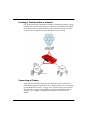
Easily installed into your network, the rack-mountable Firebox plugs in at
the Internet connection of your offices to implement security policies and
protection.
Hardware requirements
WatchGuard recommends physically installing a Firebox III under the
following conditions:
• Securely rack-mounted
• Placed in a dry, temperature-controlled environment that does not
exceed 80 degrees F
• Placed in a secured environment, such as a locked LAN room, or
similar space, to prevent physical compromise by unprivileged
personnel
• Connected to conditioned power to prevent damage caused by power
spikes and other power fluctuations
The following minimum hardware requirements pertain to the
Management Station–the computer that administers the Firebox. This
computer runs the Control Center software, which provides access to
WatchGuard Firebox System applications.
Hardware Guide
Hardware feature
Minimum requirements (Management Station)
CPU
Pentium II
Memory
Same as for operating system.
Recommended:
64 MB for Windows 98
64 MB for Windows NT 4.0
64 MB for Windows 2000 Professional
256 MB for Windows 2000 Server
Hard disk space
25 MB to install all WatchGuard modules
15 MB minimum for log file
Additional space as required for log files
Additional space as required for multiple
configuration files
CD-ROM drive
One CD-ROM drive to install WatchGuard from its
CD-ROM distribution disk
7