1
IBM Intellistation M-Pro (6889) System Integration and Reference Guide
Rev 15
MediaComposer, Symphony and Xpress NT
6.10.1
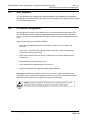
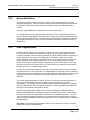
Determining the HAL Version
Use this procedure to determine the HAL on your computer system. You may use this
procedure or may perform the rename/replacement using the Windows NT Explorer. However,
if you use Explorer you will not see accurate file size information. You are encouraged to use
the command window to avoid making errors.
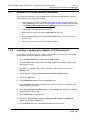
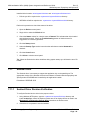
1. Open an MS-DOS command window from the Start menu.
2. C:\> cd %systemroot%\system32
3. C:\> dir hal.dll
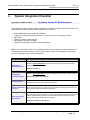
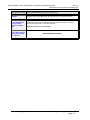
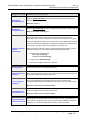
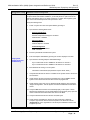
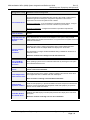
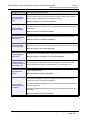
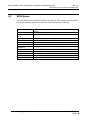
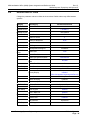
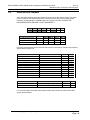
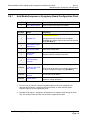
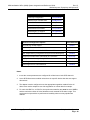
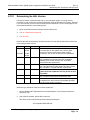
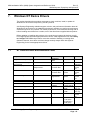
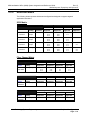
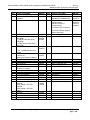
Examine the table and match the file date and size. Proceed with the instructions referenced
in the required action column.
Date
8/9/96
Size
51,424
65,664
Name
HAL.DLL
4/30/97
51,488
65,664
66,240
Required Action
These HAL files must be replaced. Indicates there is
no service pack on this system or the service pack
revision is incorrect. Install service pack 3 before
proceeding. See section on Service Pack installation.
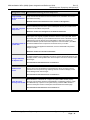
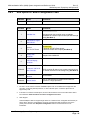
12/14/96
HAL.DLL
11/24/97
66,400
HAL.DLL
4/30/97
51,744
HAL.DLL
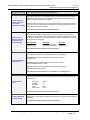
10/15/98
66,880
HAL.DLL
10/15/98
52,384
HAL.DLL
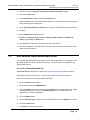
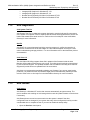
This HAL must be replaced. The system has service
pack 3 installed and is at the minimum acceptable
operating level, but the incorrect HAL is installed.
Proceed with HAL replacement.
This HAL must be replaced. The system has service
pack 3 and the pent-fix hotfix applied, and the incorrect
HAL is installed. Proceed with HAL replacement.
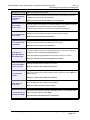
This is the correct HAL for service pack 3. The
system should be updated to service pack 4 as soon
as possible.
This HAL must be replaced. The system has service
pack 4 installed along with the default APIC HAL.
This is the correct HAL. The system has service pack
4 installed and is at the minimum acceptable operating
level. No further action is required.
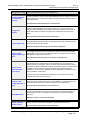
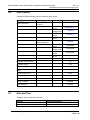
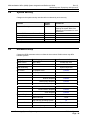
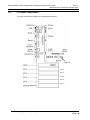
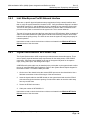
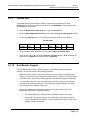
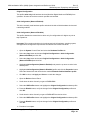
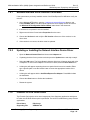
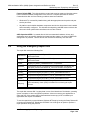
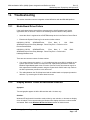
Another way to determine if the Hal must be replaced is:
1. Launch Windows NT Diagnostics from the Administrative Tools Group and select the
Resources Tab.
2. Check the box labeled “Include HAL resources”
The device column should include entries with the description:
PC Compatible EISA/ISA HAL
Avid Technology Systems Engineering
Windows NT Configuration
Page - 79