1
Hardware Installation
4.7
Optional Accessories Installation
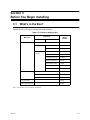
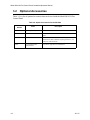
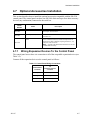
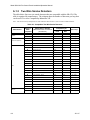
This section describes how to install the optional accessories compatible with the SK-6324
control panel. The control panel can have one SK-2104 dialer and up to four other accessory
devices (any combination) connected to the serial bus.
Model
Number
SK-2866
SK-2880
Name
Description
Remote LED Annuncaitor
Remote LED annunciator with system reset and silence key
switch inputs. See Section 4.8.
Input/Output (I/O) Module
Used to drive customized annunciators and interface devices.
See Section 4.9.
Dialer
Used to communicate alarms, trouble and supervisories to
central station. Offers 5 different reporting formats 3/1, 4/2,
BFSK, SIA, and Contact ID.
SK-2104
Note: See SK-2104 Installation manual P/N 151102
to install this accessory.
4.7.1
Wiring Expansion Devices To the Control Panel
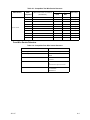
The control panel uses a three wire connection to all of the compatible expansion devices (see
Table 3-2).
Connect all the expansion devices to the control panel as follows:
Table 4-1: Control Panel Wiring Connections
151117
Control Panel
Terminals
To
Expansion Device
Terminal
-
-
+
+
D (Data)
D (Data)
4-7