1
BASIC FUNCTIONS
Selecting the playback language
Changing the camera angle
To select the playback language:
Some DVDs provide two or more different camera angles for the same
scene.
The number of the current camera angle and the number of possible camera
angles is displayed next to the camera
symbol in the on-screen display.
To change the camera angle:
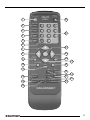
➮ Press the AUDIO button 5 once
or several times.
The playback language changes. The
on-screen display appears. The current
language, the language number and the
number of available playback languages will be displayed next to the
loudspeaker symbol.
Note:
You can also use the DVD menu to
change the playback language (see
DVD menu).
Enlarging a screen section
You can enlarge a section of the screen
in two steps up to four times its normal
size.
To enlarge a screen section twofold:
➮ Press the ZOOM button 6 once.
To enlarge a screen section fourfold:
➮ Press the ZOOM button 6 a second time.
The screen section will be displayed in
the lower left corner of the full screen.
Scroll bars will be displayed at the lower
left of the screen indicating the position
of the displayed screen section in relation to the full screen.
To move the screen section horizontally
and vertically within the full screen:
➮ Press the
E button.
28
8/
G or
7/
➮ Press the ANGLE button 3.
The scene will be displayed from the
next camera angle. The on-screen display will appear.
Note:
If no additional camera angles are available, the symbol will appear briefly.