1
Crestron ST-1700C
KEY CLICK SETUP SCREEN
1-Way Wireless RF Touchpanel
Key Click Setup
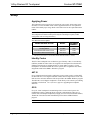
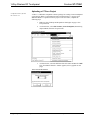
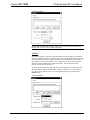
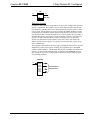
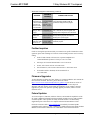
From the SETUP MENU, press the Key Click Enabled button to open the KEY
CLICK SETUP screen. (If the function is currently disabled, the button legend is
“Key Click Disabled.”)To enable an audible tone (beep) when the touchpanel
buttons are pressed, select among the Short, Med, or Long KEY CLICK
ENABLE/LEN buttons to set the duration of the tone. The touchpanel responds with
a corresponding signal. To disable the feature, select Click Off.
Use the KEY CLICK VOLUME UP and DOWN buttons to increase and decrease
the volume of the signal. The display to the right of the buttons shows the relative
volume from 0% to 100%, both as a numeric value and, for a quick visual reference,
as an analog bar.
Select the Return button to return to the SETUP MENU.
SCREEN SETTINGS BRIGHTNESS
Brightness
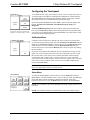
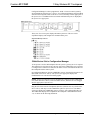
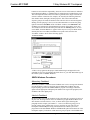
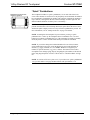
From the SETUP MENU, press the Brightness button to open the SCREEN
SETTINGS – BRIGHTNESS screen. The UP and DOWN buttons increase and
decrease screen brightness, respectively. The display to the right of the buttons
shows the relative brightness from 0% to 100%.
Select the Return button to return to the SETUP MENU.
STARTUP PREFERENCE
Startup Preference
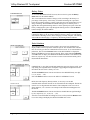
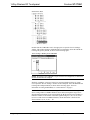
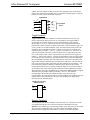
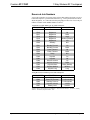
The Startup Preference option allows (when the touchpanel is off or in standby) the
display to come on or stay off when a “quick” pushbutton is pressed. From the
SETUP MENU, press the Startup Preferences button to open the STARTUP
PREFERENCE screen.
When pressed, the DISPLAY ON FROM HARDKEY button toggles between
ENABLED and DISABLED. With ENABLED selected, the display comes on when
one of the “quick” pushbuttons is pressed. With DISABLED selected, the display
stays off when a “quick” pushbutton is pressed (if touchpanel was off, it goes to
standby). The default is DISABLED.
The POWER UP ON LAST PAGE button also toggles between ENABLED and
DISABLED. Enabling this option causes the unit to “remember” the last page and
which “joins” were active when the unit was last powered down, and return to that
state when next powered on. If the option is disabled, the unit will always go to the
first page of the project and all “joins” are cleared.
Select the Return button to return to the SETUP MENU.
Operations Guide – DOC. 6050
1-Way Wireless RF Touchpanel: ST-1700C • 9