1
Connecting to a Combiner
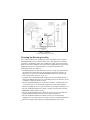
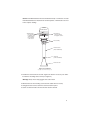
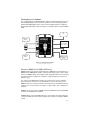
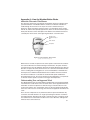
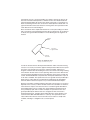
The Combiner allows the WeatherStation data to be displayed simultaneously on
both an NMEA display and a PC. On the Combiner, the two auxiliary grommets
labeled AUX NMEA OUT can be used to connect additional devices capable of
displaying WeatherStation data (see Figure 7). All display devices must be NMEA
0183.
PC
additional
display
Airmar
Smart™ Sensor
or other sensor
Weather
Station
power
supply
additional
display
NMEA display
or additional
sensor
Figure 7. Combiner installation
Copyright © 2005 Airmar Technology Corp.
What does NMEA IN and NMEA OUT mean?
NMEA IN represents input for data flowing into a NMEA device. An IN device is a
NMEA listener. NMEA OUT signifies output for data flowing out of a device. OUT
devices are NMEA talkers. The Combiner label designates data flow as viewed by
the device itself. For example, the Combiner’s output should be connected to a
display’s input.
The output of any NMEA device (talker) may connect to the inputs of multiple
devices (listener). However, it is not permissible to connect the output of one
NMEA device to the output of another. If the need arises to provide data from the
outputs of two or more devices to the input of a given device, then a Combiner is
required.
Caution: Be sure to connect a NMEA talker to the NMEA IN terminal and NMEA
listeners to the NMEA OUT terminals.
Caution: When connecting NMEA devices to one another, the cable shield only
connects at ONE end of the cable, preferably at the device providing the NMEA
output.
13