1
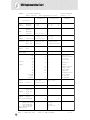
Troubleshooting
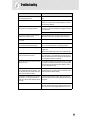
Problem
Possible Cause and Solution
When the PSR-350 is turned on or off, a popping
sound is temporarily produced.
This is normal and indicates that the PSR-350 is receiving electrical
power.
When using a mobile phone, noise is produced.
Using a mobile phone in close proximity to the PSR-350 may produce
interference. To prevent this, turn off the mobile phone or use it further away from the PSR-350.
There is no sound even when the keyboard is
played or when a song is being played back.
Check that nothing is connected to the PHONES/OUTPUT jack on
the rear panel. When a set of headphones is plugged into this jack,
no sound is output.
Check the Local Control on/off. (See page 82.)
Playing keys in the right hand section of the keyboard does not produce any sound.
When using the Dictionary function (page 46), the keys in the right
hand section are used only for entering the chord root and type.
The sound of the voices or rhythms seems unusual or strange.
The battery power is too low. Replace the batteries. (See page 8.)
The auto accompaniment doesn’t turn on, even
when pressing the [ACMP ON/OFF] button.
Make sure the Style mode is active before using the auto accompaniment. Press the [STYLE] button to enable style operations.
The accompaniment does not sound properly.
Make sure that the Accompaniment Volume (page 42) is set to an appropriate level.
Make sure that the Split Point (page 45) is set to an appropriate value.
When playing back one of the Pianist styles (#086
- #100), the rhythm cannot be heard.
This is normal. The Pianist styles have no drums or bass — only piano accompaniment. The accompaniment of the style can only be
heard when accompaniment is set to ON and keys are played in the
auto accompaniment section of the keyboard.
Not all of the voices seem to sound, or the sound
seems to be cut off.
The PSR-350 is polyphonic up to a maximum of 32 notes. If the Dual
voice or Split voice is being used and a style or song is playing back
at the same time, some notes/sounds may be omitted (or “stolen”)
from the accompaniment or song.
A strange “flanging” or “doubling” sound occurs
when using the PSR-350 with a sequencer. (This
may also sound like a “dual” layered sound of two
voices, even when Dual is turned off.)
When using the accompaniment with a sequencer, set MIDI Echo (or
the relevant control) to “off.” (Refer to the owner’s manual of your particular device and/or software for details.)
The footswitch (for sustain) seems to produce the
opposite effect. For example, pressing the footswitch cuts off the sound and releasing it sustains
the sounds.
The polarity of the footswitch is reversed. Make sure that the footswitch plug is properly connected to the SUSTAIN jack before turning
on the power.
The sound of the voice changes from note to note.
The AWM tone generation method uses multiple recordings (samples) of an instrument across the range of the keyboard; thus, the actual sound of the voice may be slightly different from note to note.
85