1
Customizing
Features / Options
Programming the
Water Softener
(Models WHES30 & WHES33)
(Models WHES30 & WHES33)
continued from previous page
NOTE: As with all other water system applications,
leaks may occur. Leaks may not be immediately apparent. Recheck for leaks 24 hours
after first recharge cycle is complete.
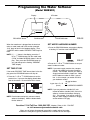
2. Press the r UP or s DOWN buttons to set your
water’s hardness number.
NOTE: If your water supply contains iron, compensate for it by adding to the water hardness
number. For example, assume your water is
20 gpg hard and contains 2 ppm iron. Add 5
to the hardness number for each 1 ppm of
iron. In this example, you would use 30 for
your hardness number.
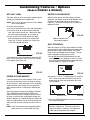
RECHARGE
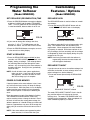
The RECHARGE button is used to initiate an immediate recharge.
1. Press and hold the RECHARGE button until the
words “RECHARGE", “SERVICE" and “FILL" flash
in the display.
20 gpg hardness
2 ppm iron x 5 = 10 +10
(times)
30 HARDNESS NUMBER
NOTE: If you use potassium chloride (KCl) salt
instead of sodium chloride (NaCl) salt in this
softener, increase the hardness setting by
25%. For example, if you will be using KCl
and your water supply’s hardness is 20 gpg,
set the softener to 25 gpg.
RECHARGE initiated
FIG. 30
The softener enters the fill cycle of regeneration right
away. “RECHARGE” will flash during the regeneration. When completed, full water conditioning capacity is restored. While water softener is running a
recharge, the time remaining until the recharge is
completed will show in the display during all cycles
except for the Fill cycle.
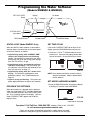
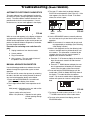
SET RECHARGE (REGENERATION) TIME
1. Press the PROGRAM button once again to display
a flashing “2:00AM” and the words “RECHARGE
TIME”. This is a good time for the recharge to start
in most households, because water is not in use.
NOTE: Avoid using hot water while the softener is
regenerating, because the water heater will
refill with bypass hard water.
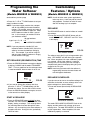
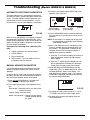
RECHARGE SCHEDULED
If you do not want to start an immediate recharge, but
would like to schedule an extra recharge at the next
preset recharge time, do the following:
FIG. 29
2. If you want to change the recharge start time,
press the r UP or s DOWN buttons until the
desired time shows. Be sure AM or PM is correct.
1. Press and release (do not hold) the RECHARGE
button.
3. Press the PROGRAM button once again, to return
to the normal time of day display.
START A RECHARGE
1. Press the RECHARGE button and hold for three
seconds, until “RECHARGE” begins to flash in the
display, starting a recharge. This recharge draws
the sanitizing bleach into and through the water
softener. Any air remaining in the water softener is
purged to the drain. During this time, periodically
check for leaks.
RECHARGE scheduled
FIG. 31
The words “RECHARGE SCHEDULED" flash in the
display, and the softener will recharge at the next
recharge time. The word “RECHARGE" will flash during the regeneration. When completed, full water
conditioning capacity is restored.
16